





The best apps for charging electric vehicles
When travelling in an electric car, the main question is simple: where to charge? And here, without a convenient app on your phone, you're like a man without hands. A good app not only shows you the nearest station, but also tells you its type, price, whether it is free at the moment, and often allows you to pay for charging in one click. But not all apps are the same: each has its own [...]
Content:
When travelling in an electric car, the main question is simple: where to charge? And here, without a convenient app on your phone, you're like a man without hands. A good app not only shows you the nearest station, but also tells you its type, price, whether it is free at the moment, and often allows you to pay for charging in one click. But not all apps are the same: each has its own features, coverage, and level of convenience.
We've compiled a list of the best electric vehicle charging apps used by drivers around the world. Some work better in Europe, others in the US or Asia. But all of them have one thing in common: they help you avoid unnecessary nerves when the charge level starts to drop and the nearest outlet is still a question.
We remind you that you can purchase home and commercial charging stations in our online storeand also use the public charging stations ECOFACTORcharging points located throughout Ukraine. For convenient access to charging infrastructure, we recommend using our mobile applicationwhich is available on iOS and Android.

1. ECOFACTOR EV Charging
When it comes to conveniently charging an electric vehicle in Ukraine, we understand how important it is to have a reliable tool at your fingertips. Our ECOFACTOR EV Charging app helps you find a charging station nearby, filter it by connector type and power, check the status in real time, and start charging right away. All of this is available from a single interface, where each action takes a few seconds and does not require unnecessary movements. There's no need to call or search forums separately - the app shows you where there are free charging points suitable for your car, and even allows you to book a point.
We tried to make the app useful for every type of trip - from a short trip around the city to a long journey with several stops. After choosing a route, you can immediately see which charging stations are available along the way and which one is currently working. Even payment is easy - we support Apple Pay, Google Pay, and cards. You can switch the charger on or off right from your phone without leaving the car. And if something goes wrong, support is always in the app.
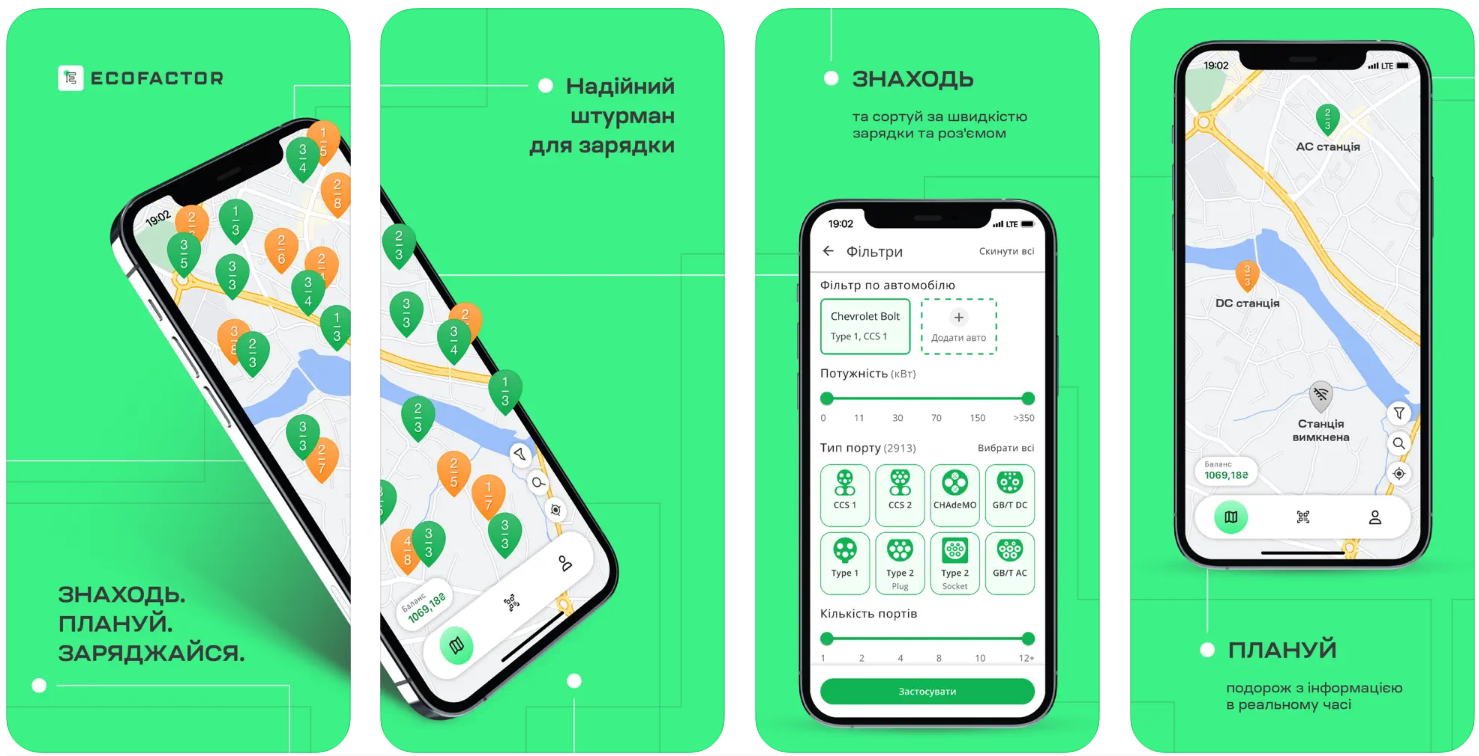
What the ECOFACTOR EV Charging app gives you:
- search for charging stations by connector type (Type 1, Type 2, CCS1, CCS2, CHAdeMO, etc.)
- power filters (e.g. 7 kW, 22 kW, 50 kW)
- view the availability of stations in real time
- Possibility of booking 15 minutes before arrival
- payment via Apple Pay, Google Pay or bank card
- Remote charging control and progress view
- Saving the history of charges and expenses
- access to support directly in the application
Contact information:
- Website: ecofactortech.com
- App Store: apps.apple.com/ua/app/ecofactor-ev-charging/id1438716797
- Google Play: play.google.com/store/apps/details?id=eu.ecofactor
- E-mail: [email protected]
- Facebook: www.facebook.com/ecofactor.ua
- Instagram: www.instagram.com/ecofactor.ua
- Address: 113 Otamana Holovatogo St., Odesa, Odesa region, 65000
- Phone number: +38 (097) 798 88 80

2. PlugShare
PlugShare is an app that has long been a familiar tool for many electric car drivers, including in Ukraine. Its main advantage is a detailed map of charging stations, complete with photos and user reviews. In the app, you can filter stations by plug type, charging speed, or provider. This is handy when you need to quickly find a station for your car and know in advance what awaits you there.
It's worth noting that PlugShare supports search not only in Ukraine but also around the world, which is why it is often used when travelling abroad. Among the features are route mapping with charging stations, accessibility checks, integration with Apple CarPlay, and the ability to add new points to the map. Some charging stations support payment directly through the app. All of this makes the app a universal assistant for electric motorists.
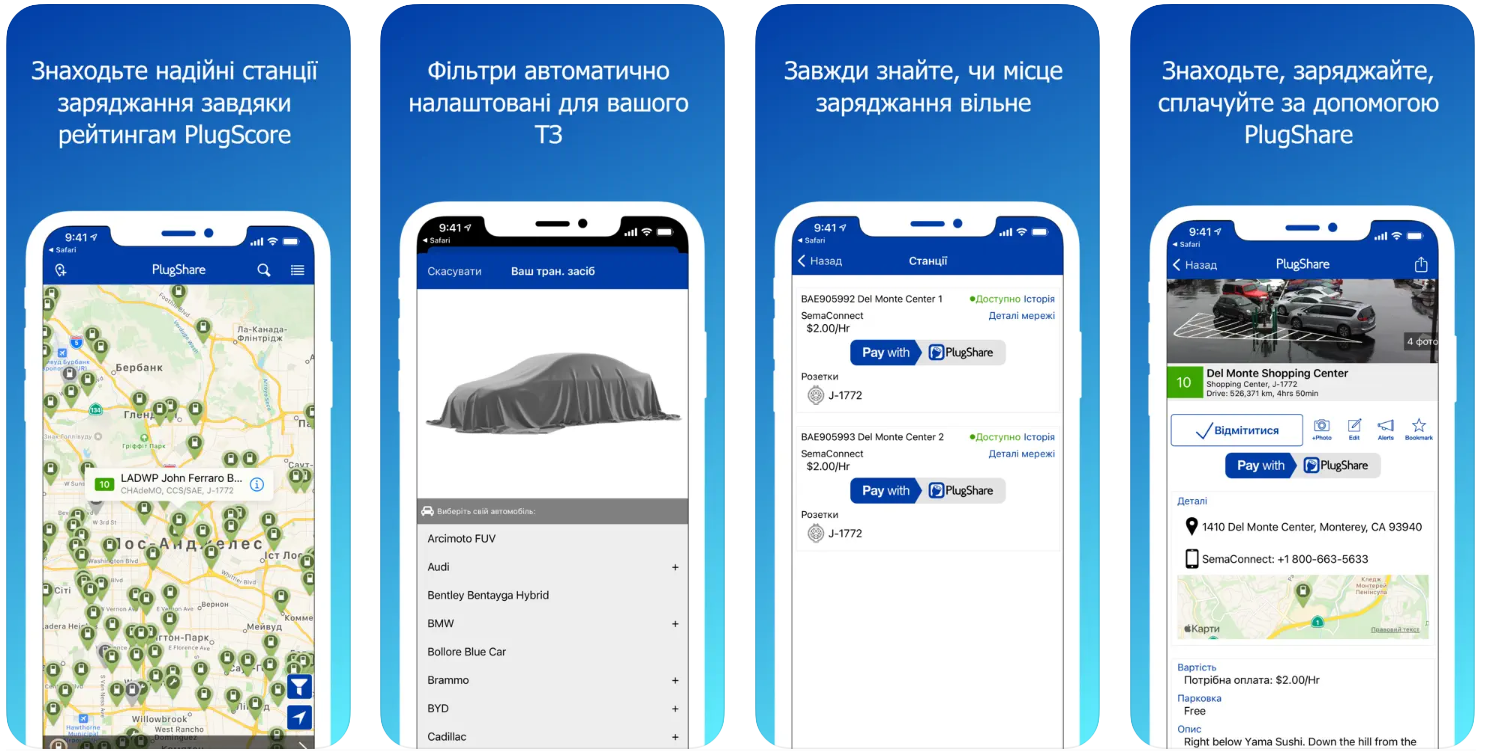
Features that will be useful for drivers in Ukraine:
- Filters by plug type, speed, provider and amenities
- real photos and comments from other drivers
- checking the availability of stations in real time
- convenient search for stations along the route
- support for YASNO, AutoEnterprise, Ionity, TOKA and other networks
Contact information:
- Website: www.plugshare.com
- App Store: apps.apple.com/ua/app/plugshare-charging-stations/id421788217
- Google Play: play.google.com/store/apps/details?id=com.xatori.Plugshare
- E-mail: [email protected]
- Facebook: www.facebook.com/plugshare
- Twitter: x.com/plugshare
- LinkedIn: www.linkedin.com/company/plugshare
- Instagram: www.instagram.com/plugshare
- Address: 1661 E. Franklin Ave, El Segundo, CA 90245

3. Tesla
This app is designed exclusively for Tesla owners, so its functionality is focused on integration with the car. It allows you to remotely view the charge level, start or stop charging, warm or cool the cabin before a trip, send the address for navigation, or even open the doors. But in the context of charging infrastructure, its main role is to conveniently manage the charging process through the native Tesla ecosystem.
For a Ukrainian user, the app may seem a bit limited, especially due to the lack of localisation in Ukrainian and because not all functions work consistently. For example, the Apple Watch app can only display the remaining charge, without the ability to perform other actions. Nevertheless, it is a basic and mandatory tool for driving a Tesla, without which it is difficult to use the car fully.
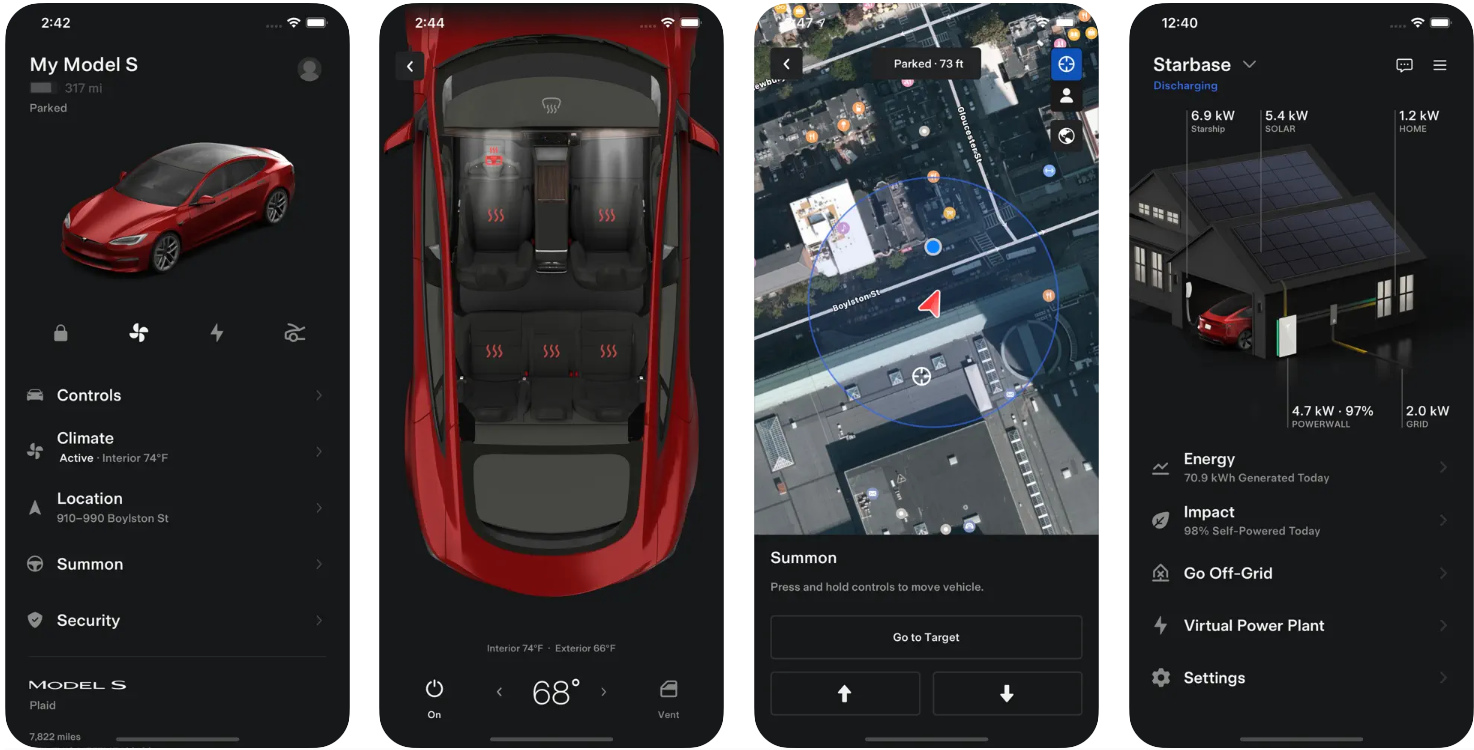
What you can do through the app:
- remotely control charging
- plan trips by sending addresses to the navigation
- start pre-conditioning of the cabin
- open the car or sound the horn
- receive software updates
Contact information:
- Website: www.tesla.com
- App Store: apps.apple.com/ua/app/tesla/id582007913
- Google Play: play.google.com/store/apps/details?id=com.teslamotors.tesla
- E-mail: [email protected]
- Address: 1 Tesla Road Austin, Texas 78725

4. ChargePoint
ChargePoint is an app that combines several functions at once: finding charging stations, managing the charging process and monitoring costs. It is convenient to use both for public charging and at home if you have the appropriate equipment. You can search for stations on a map, filter by connector type, charging speed, or partner networks. Everything you need to know before you arrive at a station is in one place - status, price, driver comments, and even peak hours.
Integration with other systems is also worth paying attention to: Apple Watch, CarPlay, and the ability to connect a widget to your phone screen for quick access. The application allows not only charging but also monitoring the history of sessions, receiving notifications when charging is complete or the point is free. Some users point to limitations in managing multiple home stations through a single account, but in public use, the app proves to be stable.
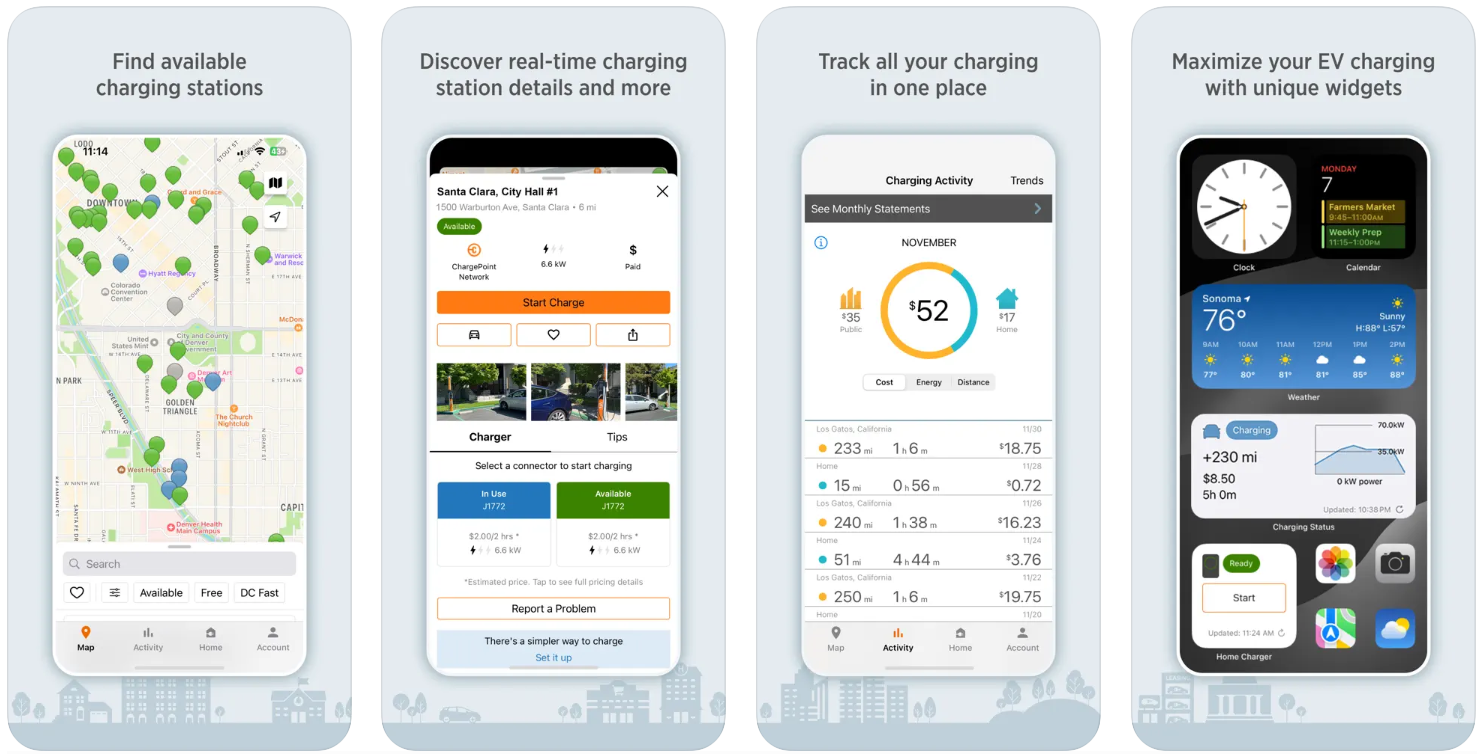
What ChargePoint allows you to do:
- locate charging points in real time
- filter stations by type of connector and charger
- start charging through the application, without additional cards
- view history, costs and distance travelled
- control your home charger from your phone
Contact information:
- Website: www.chargepoint.com
- App Store: apps.apple.com/us/app/chargepoint/id356866743
- Google Play: play.google.com/store/apps/details?id=com.coulombtech
- Facebook: www.facebook.com/ChargePoint
- Twitter: x.com/chargepointnet
- LinkedIn: www.linkedin.com/company/chargepoint
- Instagram: www.instagram.com/chargepoint
- Address: 240 East Hacienda Avenue, Campbell, CA 95008 USA
- Phone number: 1-408-841-4500

5. NextCharge
NextCharge is aimed at drivers who want a simple and fast charging solution with no registration required. It can be used even without creating an account, and you can start charging right from the first start. The app shows nearby stations, allows you to read and leave reviews, and create routes based on the type of car, speed, and even road terrain. This approach is more suitable for those who travel and want an accurate calculation of energy consumption.
Users can also manage multiple sessions at the same time, which can be convenient in the case of multiple vehicles. In addition, there is a station reservation system and a Park&Charge function that automatically starts charging through the last used connector. CarPlay is also supported, which makes it easier to navigate on the road. The application works without unnecessary bells and whistles, but with all the necessary functionality.
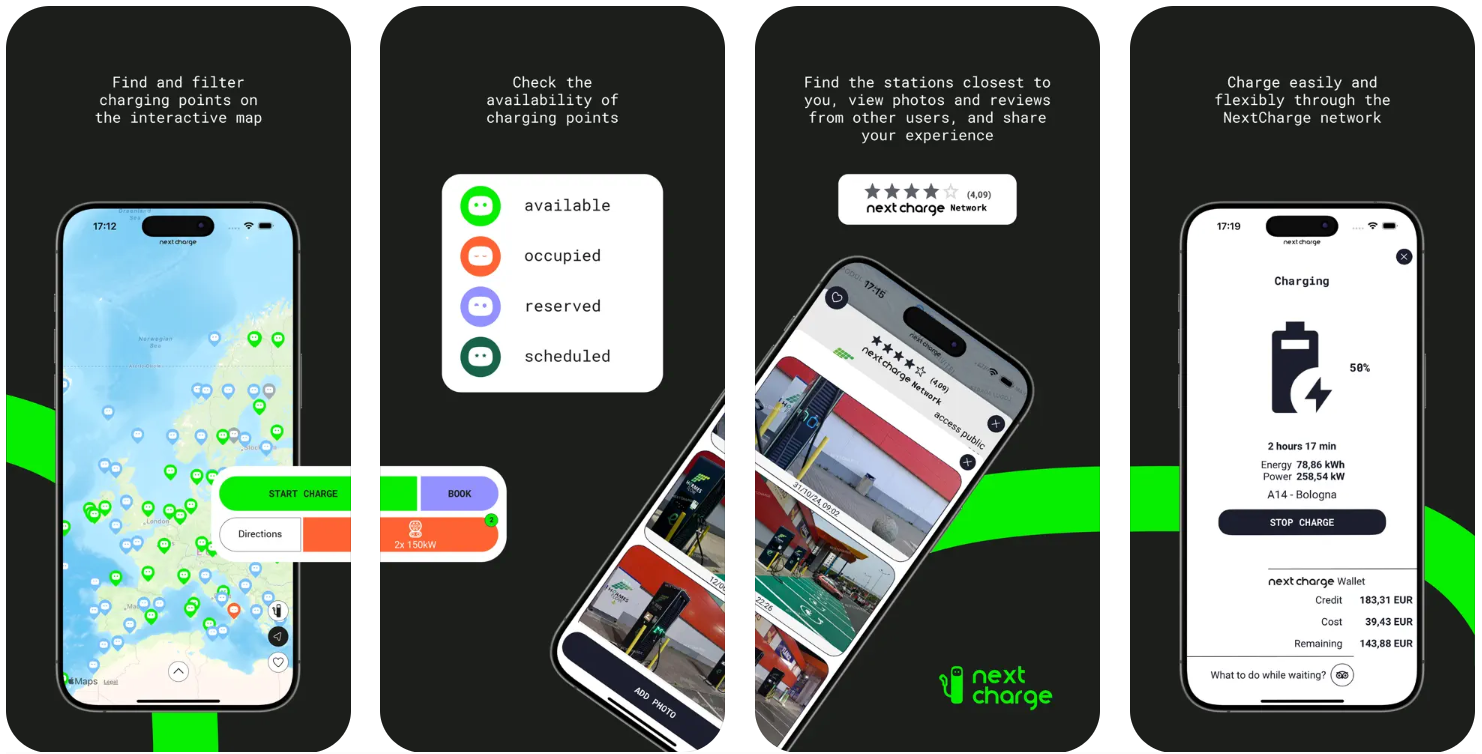
Features offered by NextCharge:
- charging without an account
- Creating routes based on costs
- booking of charging stations
- driving several cars at the same time
- convenient display of information via CarPlay
Contact information:
- Website: nextcharge.app
- App Store: apps.apple.com/ua/app/nextcharge/id614946715
- Google Play: play.google.com/store/apps/details?id=com.goelectricstations.nextcharge
- E-mail: [email protected]
- Address: VIA DI CORTICELLA 184/10 40128 BOLOGNA Italy
- Phone number: +39 051 1950 0272
6. ChargeHub
ChargeHub covers charging points across North America and allows you to not only find a station, but also to plot a route to it. Users can view photos, leave reviews, add new locations and see real-time availability for individual networks. All this is displayed on a map in a user-friendly interface. The app allows you to pay for charging, but it doesn't work equally well with all stations. There are complaints in the reviews about difficulties with top-ups or activating sessions.
In addition to the map, ChargeHub supports filters, history view, chat between users, and the ability to request permission to use the station from other drivers. Some features only work with networks that are integrated into the app, so it's best to check compatibility before using it in a new city. The app can be useful for planning trips and quickly finding charging points in large cities, but it is not yet suitable for everyday use in Ukraine.

The main functions of ChargeHub:
- search for stations and build routes
- view availability in real time
- the ability to add new points
- integration with popular charging networks
- internal chat between users of the application
Contact information:
- Website: chargehub.com
- App Store: apps.apple.com/us/app/chargehub-ev-charge-point-map/id548640732
- Google Play: play.google.com/store/apps/details?id=com.crosschasm.evchargerlocator
- E-mail: [email protected]
- Facebook: www.facebook.com/ChargeHubEV
- Twitter: x.com/ChargeHub_EV
- Instagram: www.instagram.com/chargehub_ev
- Address: 16647 Hymus Boulevard, Kirkland, QC, H9H 4R9
- Phone number: 18884000164

7. Chargeway
Chargeway is designed to make charging an electric vehicle as simple and straightforward as possible. Instead of technical names and complicated filters, everything is based on colours and numbers: each type of connector has its own colour, and power levels are indicated by numbers. This makes it easy to navigate even for beginners. The app has a real-time interactive map that shows which stations are working, which are busy, and how long it will take to charge.
In addition to finding stations, Chargeway also allows you to plan trips based on battery, weather conditions, driving speed, and other factors. All this works even without built-in car navigation. The user-friendly interface allows you to add multiple cars, view charge data, and see where there is a cafe or store nearby so you don't just wait at the outlet. It supports many networks in the US and Canada, but in Ukraine, the app can also be useful for planning trips abroad or navigating by type of charging.
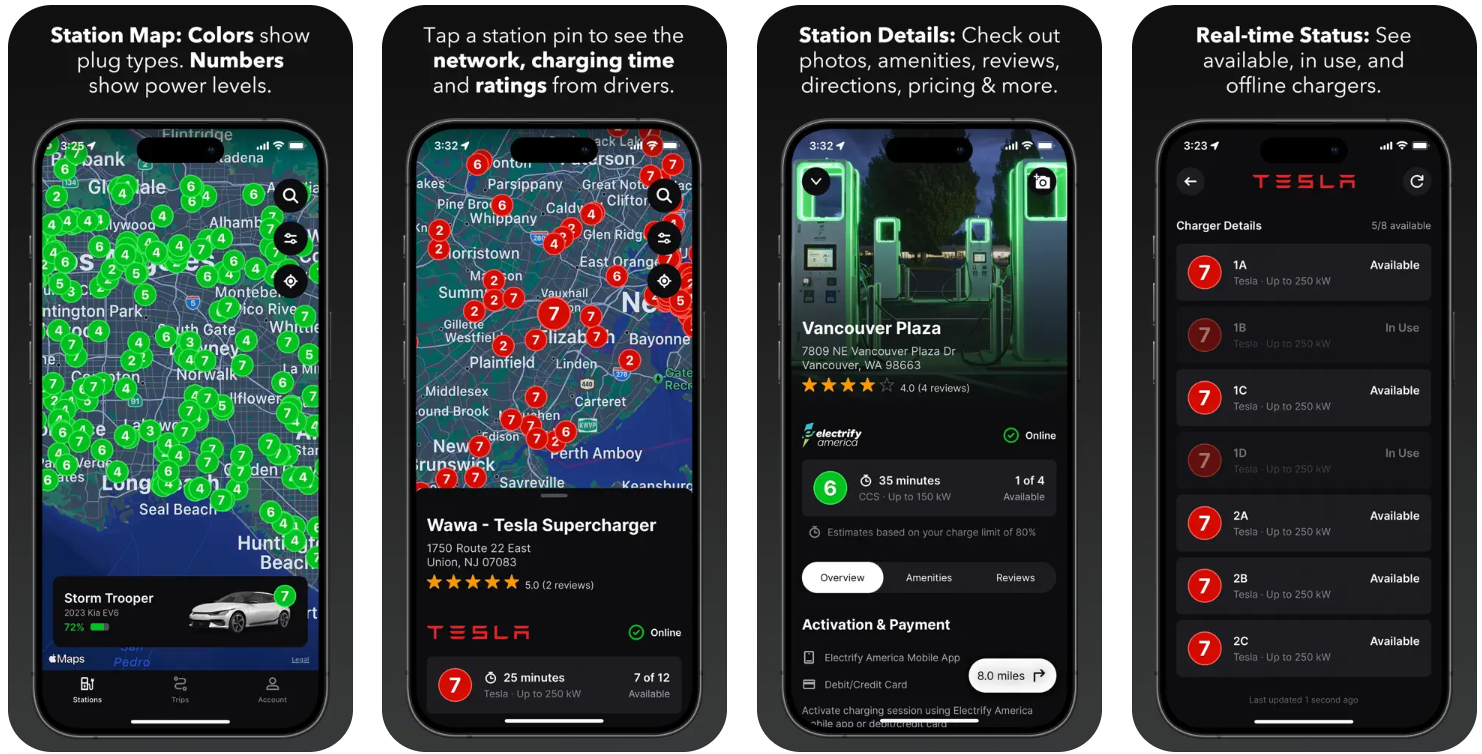
What Chargeway allows you to do:
- see compatible charging stations by colour
- estimate charging time depending on the battery
- Plan your route based on temperature and speed
- view establishments near the charging point
- add reviews and photos after charging
Contact information:
- Website: www.chargeway.net
- App Store: apps.apple.com/us/app/chargeway/id1434740229
- Google Play: play.google.com/store/apps/details?id=net.chargeway.chargeway
- E-mail: [email protected]
- Facebook: www.facebook.com/chargeway
- Twitter: x.com/chargeway
- LinkedIn: www.linkedin.com/company/chargeway
- Instagram: www.instagram.com/chargeway
- Address: 4039 N Mississippi Ave Ste 103 Portland, OR 97227 United States
- Phone number: +1 503-454-6801

8. EV Connect
EV Connect is an app that combines basic charging functionality with real-time status tracking. Its interface is quite simple: drivers can find a charging station by location, capacity, ID or availability level, and then start charging by scanning a QR code. The app also allows you to receive notifications when a session is complete, view your history, and save your favourite locations.
One of the advantages of EV Connect is the ability to send reports on problems at the stations, as well as receive a receipt in the mail after each charge. Some users note that the number of supported stations in certain regions is small, but the technical support is stable. The app is more focused on those networks that are integrated into their platform, so it can be useful for Ukrainian drivers when travelling outside the country.
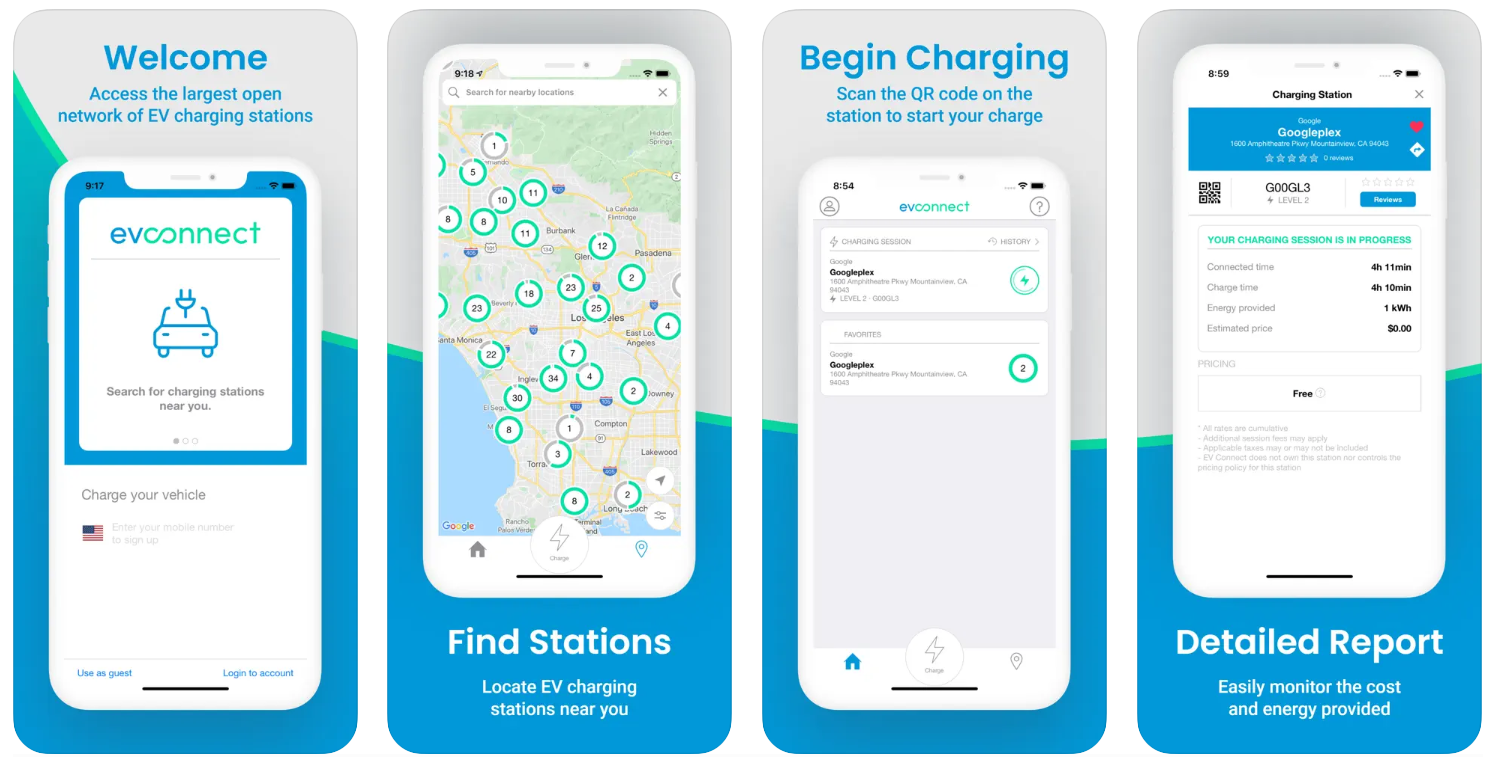
What EV Connect offers:
- search and start charging by QR code
- view the current session and receive notifications
- session history and email receipts
- reports on busy or faulty chargers
- adding favourite locations for quick access
Contact information:
- Website: www.evconnect.com
- App Store: apps.apple.com/us/app/ev-connect/id1197712470
- Google Play: play.google.com/store/apps/details?id=com.evconnect.ionic
- E-mail: [email protected]
- Twitter: x.com/EVConnect
- LinkedIn: www.linkedin.com/company/ev-connect
- Address: 26521 Rancho Parkway S, Lake Forest, CA 92630
- Phone number: (888) 780-0062
9. Chargemap
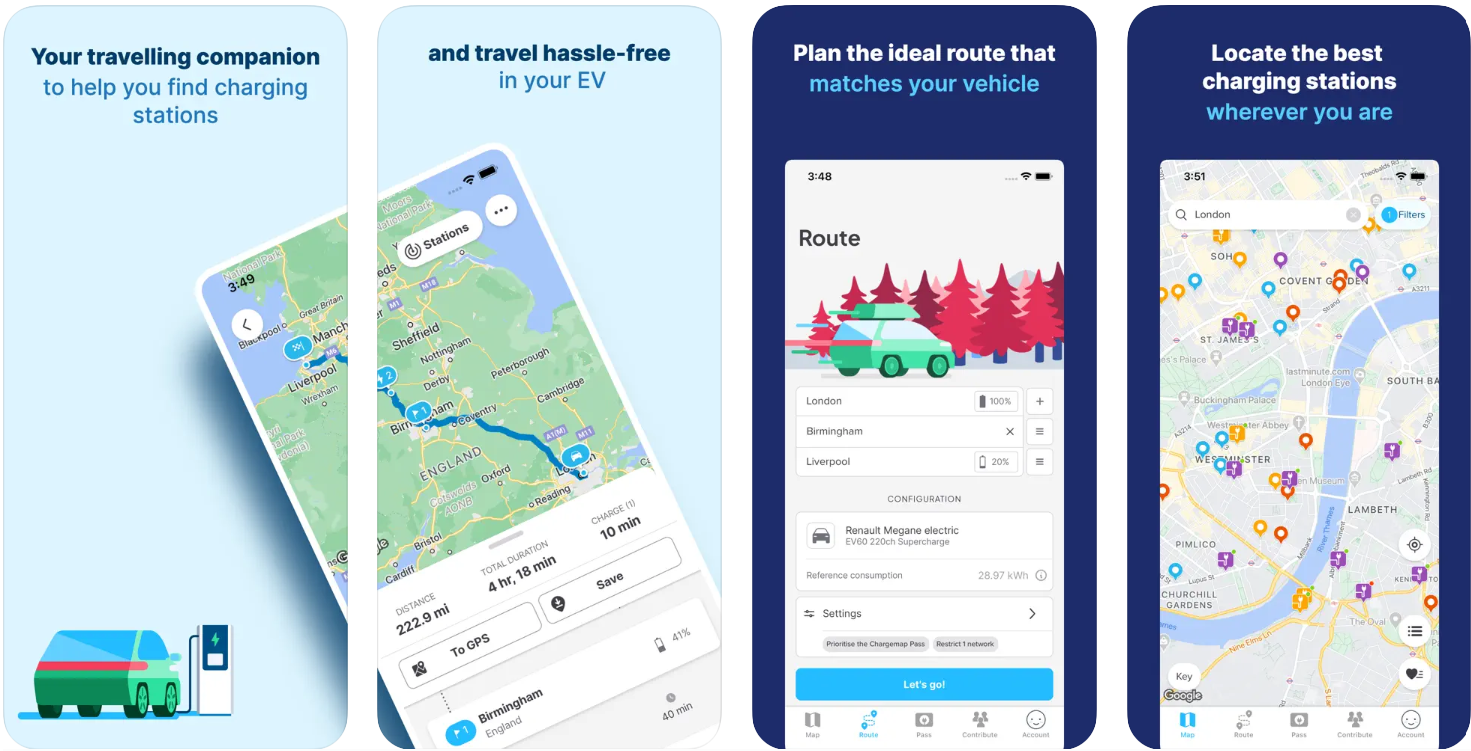
Chargemap is aimed at drivers travelling across Europe who want to see as much information as possible about charging stations. Its map covers a large number of networks, and convenient filters allow you to quickly find the right point by plug type, power, accessibility, or even Wi-Fi availability. Additional features include the ability to rate a station, add a photo, and see reviews from other drivers.
The app also has a built-in trip planner, where you can take into account the parameters of your car, route and available stations. If a certain area is not covered by the network, the system will show this and offer a detour. There is support for Apple CarPlay and even the ability to start charging directly through the app if you use Chargemap Pass. All this makes the app convenient for long journeys or planning a route in advance.
What you can do with Chargemap:
- search for stations with advanced filtering
- view ratings, photos and reviews
- plan routes with charging in mind
- use Chargemap Pass for payment
- start charging directly from the app on individual networks
Contact information:
- Website: chargemap.com
- App Store: apps.apple.com/ua/app/chargemap-charging-stations/id438176982
- Google Play: play.google.com/store/apps/details?id=com.chargemap_beta.android
- E-mail: [email protected]
- Facebook: www.facebook.com/Chargemap
- Twitter: x.com/Chargemap
- LinkedIn: www.linkedin.com/company/chargemap
- Instagram: www.instagram.com/chargemap_com
- Address: 7 ALLEE CERES 67200 STRASBOURG France
- Phone number: +33 7 83 85 31 59
10. Shell Recharge
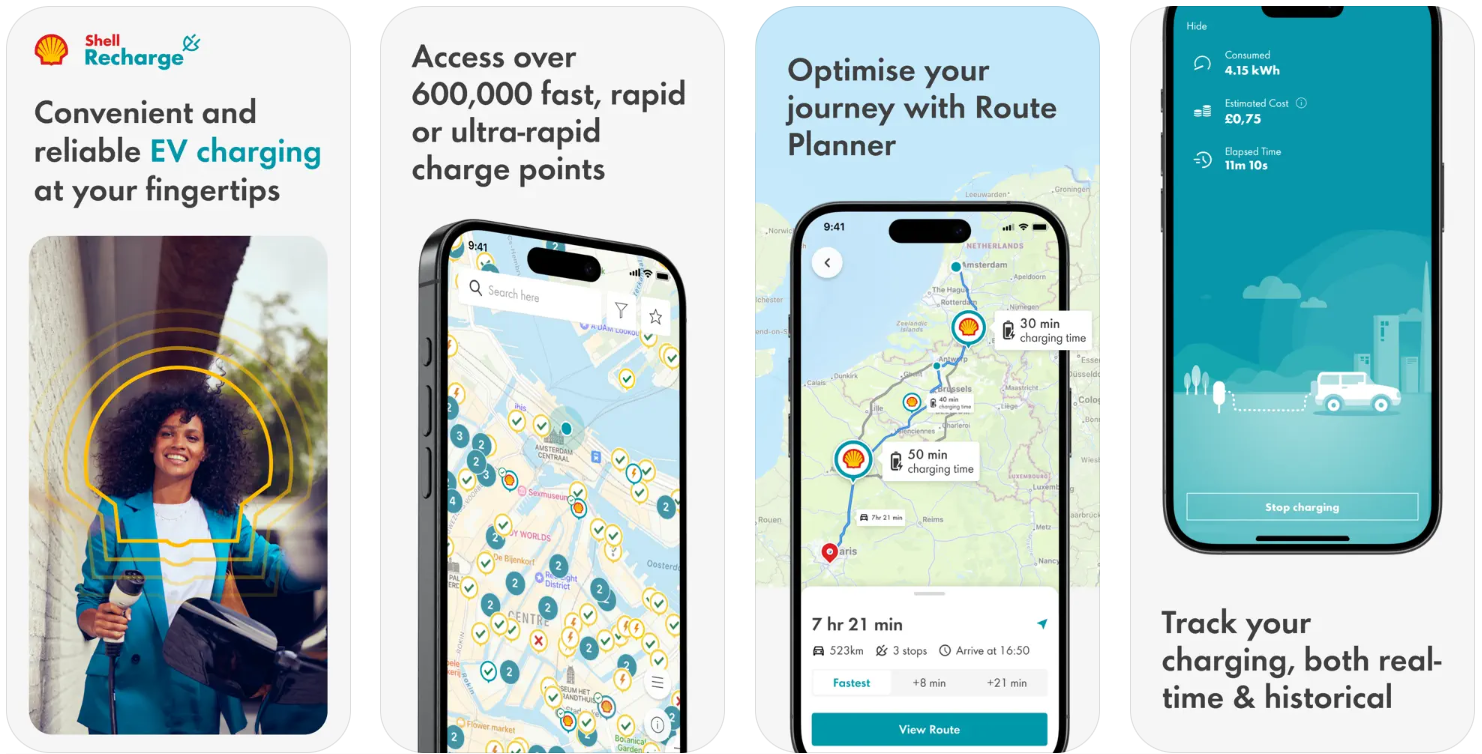
Shell Recharge is suitable for those who travel frequently across Europe and are looking for charging points on the road, at home or near work. The app has a large number of points available, which can be quickly found using filters by country, connector type, charging speed or price. For Ukrainian drivers travelling abroad, this can be a useful solution for planning trips without having to switch between multiple platforms.
In addition to finding charging stations, Shell Recharge allows you to add a home charger to manage everything from one app. Payment details are stored in your account, and the charging process can be started from your phone or card. Sometimes there are problems with authorisation or updating your profile, which is inconvenient, especially when you need to charge your car quickly. But in general, the interface is clear, and the main functions work stably.
What you can do at Shell Recharge:
- find charging points in more than 30 European countries
- manage charging at home and outdoors through one app
- filter points by price, availability and connector type
- View your charging history and save your favourite locations
- pay for charging via the app or card
Contact information:
- Website: www.ua.shell
- App Store: apps.apple.com/gb/app/shell-recharge/id549121633
- Google Play: play.google.com/store/apps/details?id=com.thenewmotion.thenewmotion
- E-mail: [email protected]
- Facebook: www.facebook.com/Shell
- LinkedIn: www.linkedin.com/company/shell
- Instagram: www.instagram.com/shell
- Address: 4 M. Grinchenko St. (Horizon Park Business Centre), Kyiv, 03038
- Phone number: +380 44 495 08 00

11. EVHotels
EVHotels is not a typical electric car charging app. Its main function is to help drivers find hotels where they can charge their cars. It is aimed at those who plan to spend the night on the road or want to combine a stopover with charging. The search is designed so that you can choose a hotel chain, type of connector, and even set the desired distance to a public charging station if the hotel does not have its own.
The app allows you to browse a large list of hotels around the world that either have charging points or are located nearby. For Ukrainian drivers, it will be useful mainly for business trips or tourist trips in Europe, when you need to know in advance that you can connect your car to the network at the place of overnight stay. The app is paid, but it works stably and offers useful filtering.
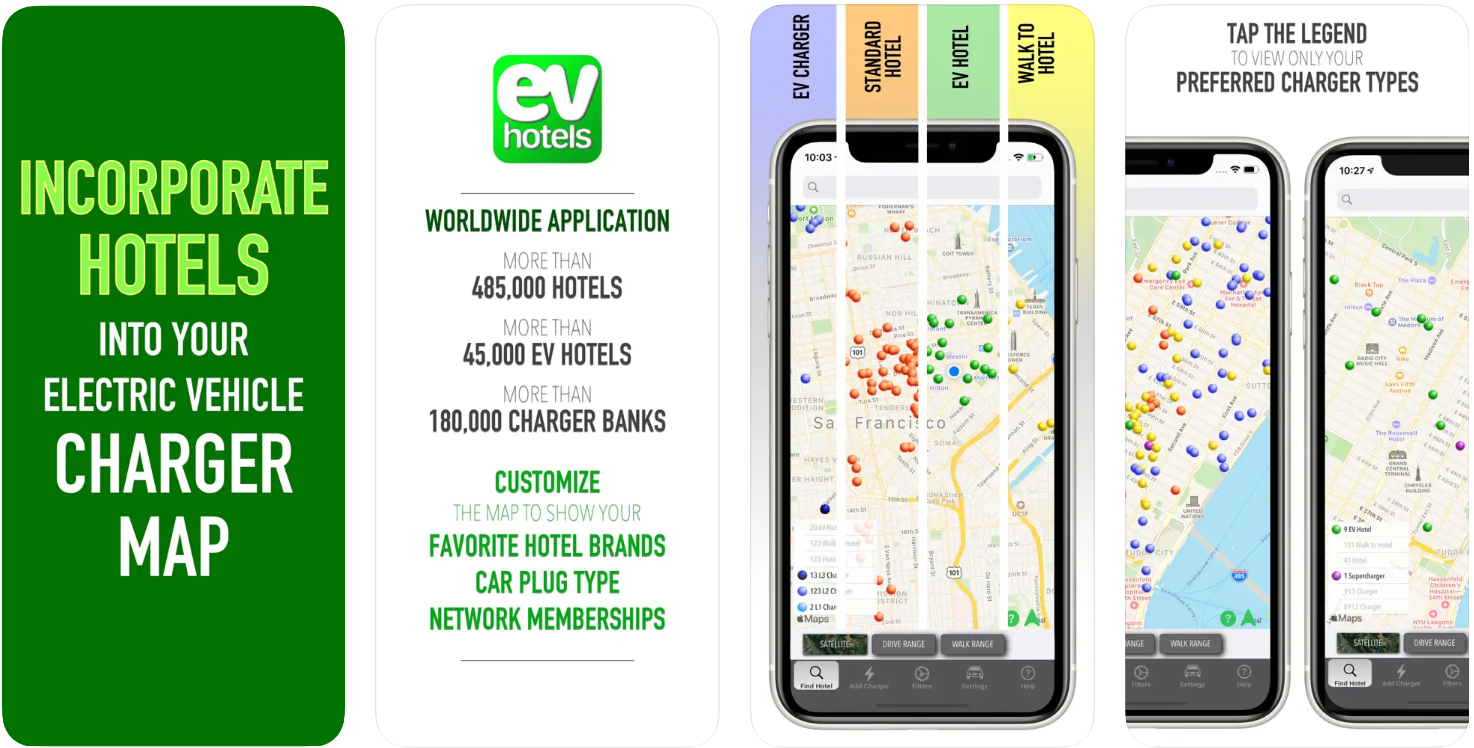
EVHotels' capabilities:
- search for hotels with charging points or near them
- selection of hotel brands and supported charging networks
- filtering by car type and connector
- route planning with overnight stops
- access to a large database of hotels around the world
Contact information:
- Website: www.evhotels.org
- App Store: apps.apple.com/ua/app/evhotels/id1343918730
- Facebook: www.facebook.com/EVHotelsApp
- LinkedIn: www.linkedin.com/company/evhotels

12. Electrify America
Electrify America is focused primarily on the US market, but it can be useful for those planning a trip there with an electric car. The app allows you to find charging points, view their availability in real time, save your favourite points, and pay for charging via your phone. There are two versions of the app: a free version and a subscription with a lower price per kilowatt, which can be beneficial for frequent travellers.
The app has a Plug&Charge function that allows you to start charging without any on-screen actions if your car supports this feature. It is also convenient to view session history, charging status, and send receipts to the mail. However, some users complain about freezing during charging or inaccurate data. For Ukrainian drivers, this solution is relevant mainly when renting an electric car in the United States.
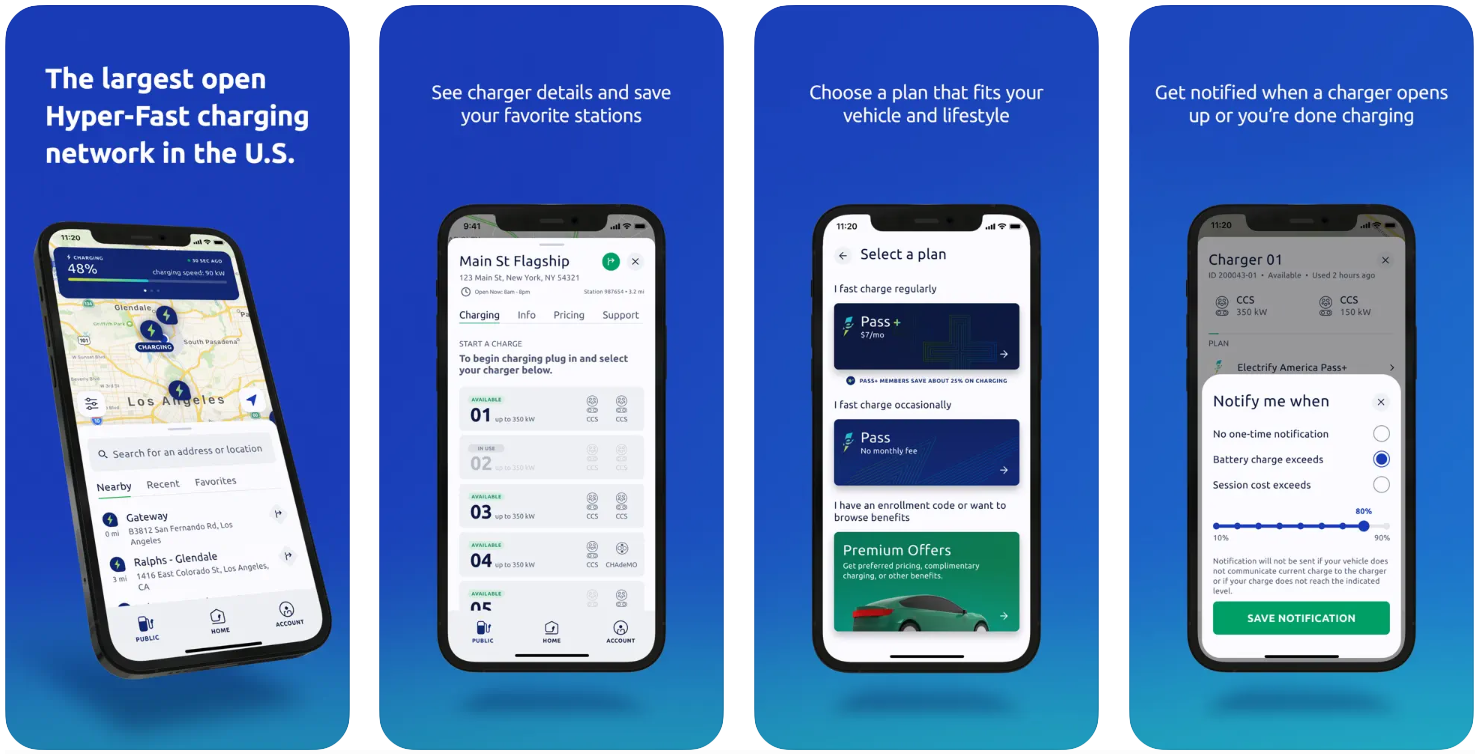
What is available in Electrify America:
- search for charging stations on the map
- View the availability and status of charging
- contactless payment and history storage
- subscription with a lower charging rate
- use of Plug&Charge, if auto is supported
Contact information:
- Website: www.electrifyamerica.com
- App Store: apps.apple.com/us/app/electrify-america/id1458030456
- Google Play: play.google.com/store/apps/details?id=com.ea.evowner
- E-mail: [email protected]
- Facebook: www.facebook.com/ElectrifyAmerica
- Twitter: x.com/electrifyam
- LinkedIn: www.linkedin.com/company/electrifyamerica
- Instagram: www.instagram.com/electrifyamerica
- Address: 1950 Opportunity Way Ste 1500 Reston, VA 20190 United States
- Phone number: 1-833-632-2778
13. Open Charge Map
Open Charge Map is suitable for those looking for a simple, non-commercial tool for finding charging stations. It is an open platform where users add new points, update information, share comments and photos. For Ukrainian drivers who want to see more up-to-date data across Europe and are not dependent on a single provider, this option can be useful, especially when travelling abroad.
The app's interface is minimalistic, with the main function being to find a charging point nearby or on the route. As the system is community-based, the data is both very detailed and not entirely complete in some regions. But the approach itself allows you to influence the quality of information by actively leaving feedback or adding new locations.
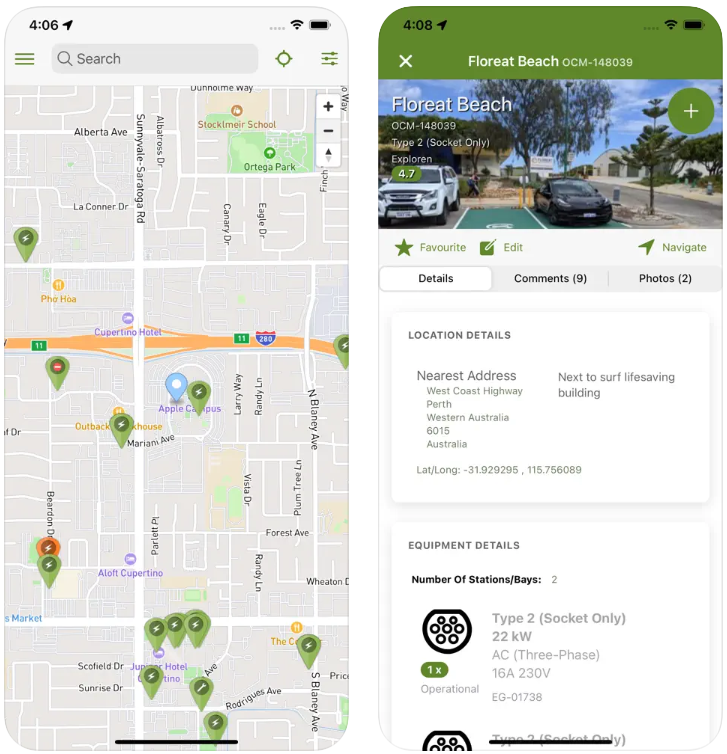
What you can do in Open Charge Map:
- find charging stations at or near the selected location
- edit and supplement information about stations
- plan a route with charging points
- leave ratings, comments and photos
- View updates made by other users
Contact information:
- Website: openchargemap.org
- App Store: apps.apple.com/us/app/open-charge-map/id528951115
- Google Play: play.google.com/store/apps/details?id=com.webprofusion.openchargemap
- E-mail: [email protected]
- Facebook: www.facebook.com/openchargemap
- Twitter: x.com/open_charge_map
- Address: 8 Windarra Dr City Beach WA 6015 Australia
- Phone number: +61 439 835 171
14. A Better Routeplanner (ABRP)
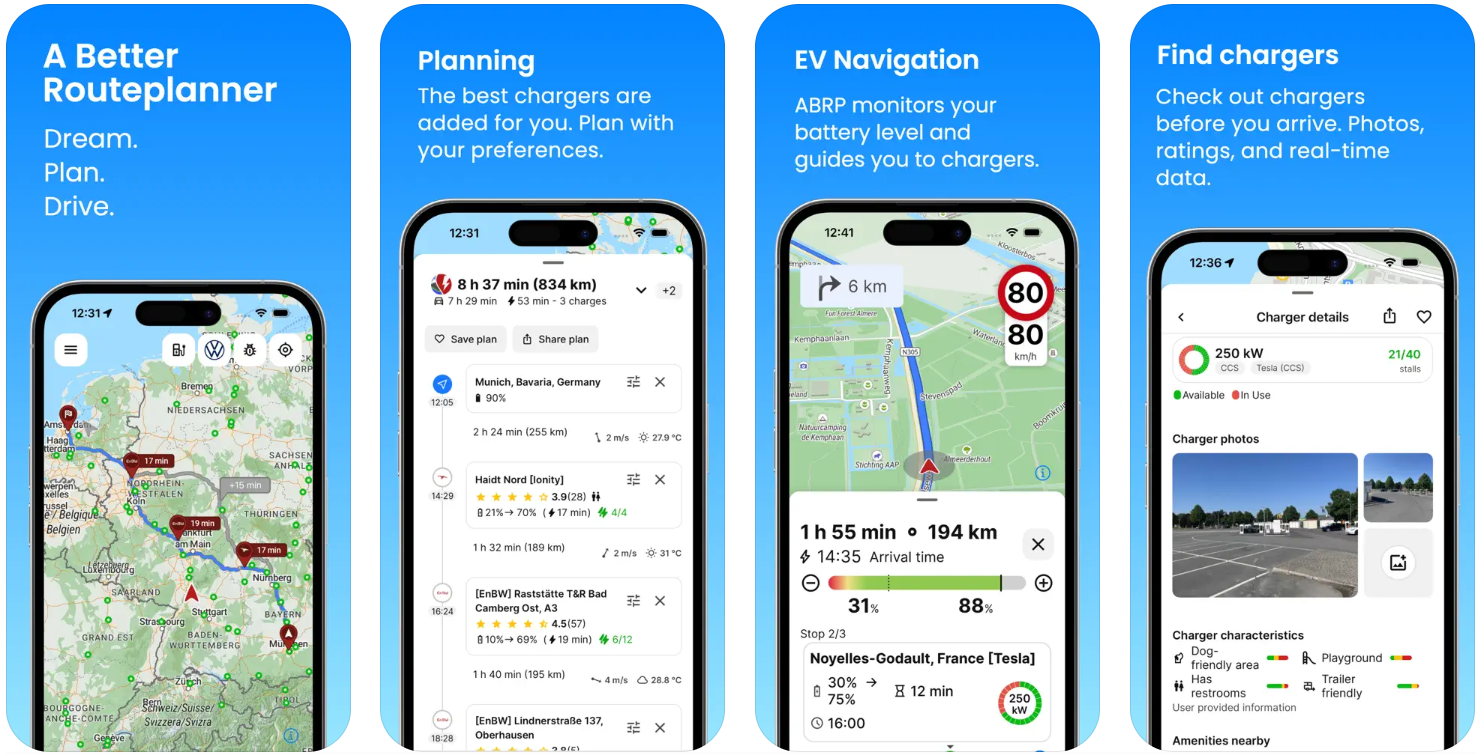
A Better Routeplanner is a handy tool for those who want to plan a trip with an electric car in mind. The app allows you to choose a car model, set a destination, and the system will tell you where to charge and how long it will take. For Ukrainian drivers travelling across Europe or to other countries, this can be useful to avoid unexpected stops.
In the app, you can activate real-time mode to see updates while driving. You can also connect your car via API or OBD to take into account the actual charge level. There are certain limitations, such as the inability to fully filter charging networks, which can be inconvenient if you use a subscription to a specific operator. But in general, route planning is one of the most detailed.
What ABRP allows you to do:
- plan routes with charging in mind
- take into account temperature, speed, charge level
- connect cars for more accurate forecasts
- see the approximate journey time and number of stops
- change the route manually by adding intermediate points
Contact information:
- Website: abetterrouteplanner.com
- App Store: apps.apple.com/ua/app/a-better-routeplanner-abrp/id1490860521
- Google Play: play.google.com/store/apps/details?id=com.iternio.abrpapp
- E-mail: [email protected]
- Address: Scheelevägen 15 223 70 Lund Sweden
- Phone number: +46 70 611 59 22
15. My BMW
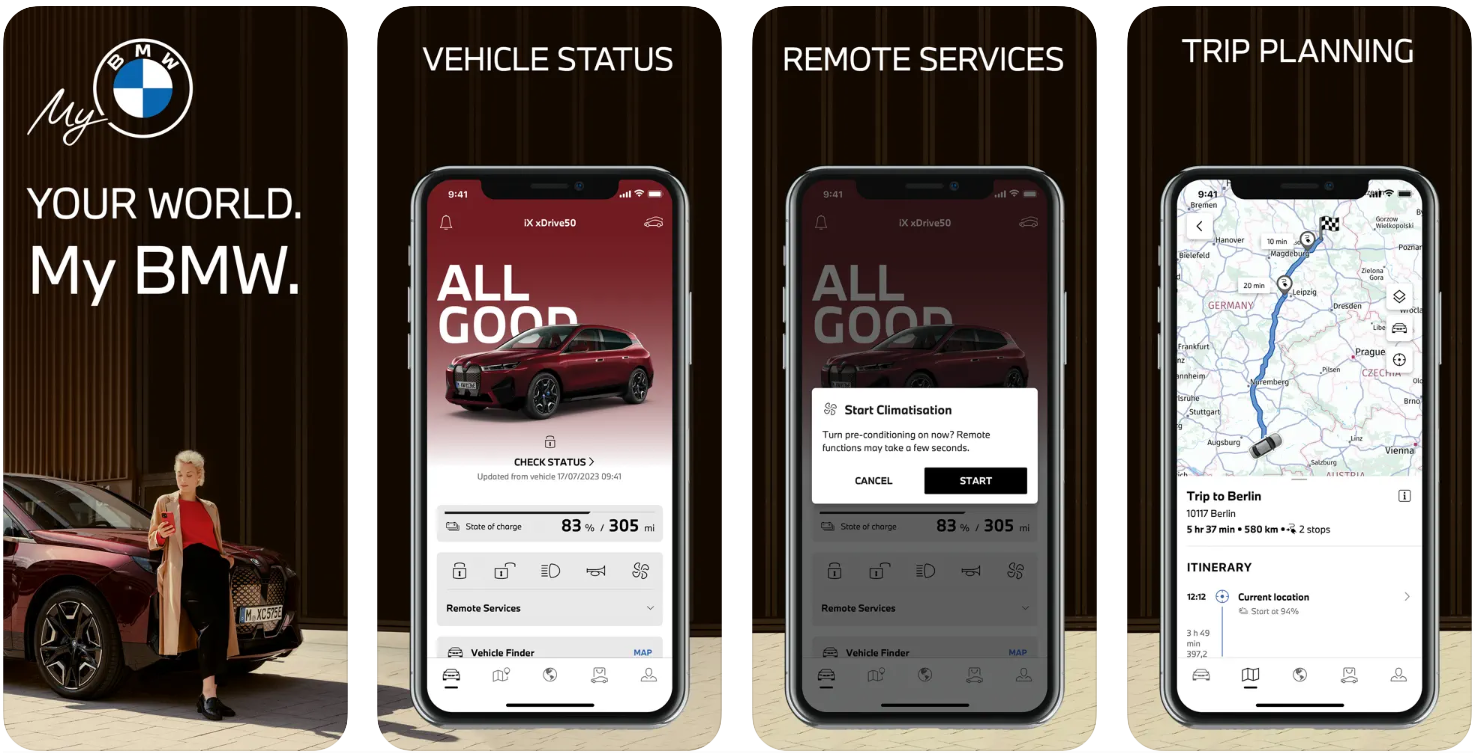
My BMW is not just a charging app, but a full-fledged car management tool. It works only with BMW cars, but if you have one, you get a wide range of features. You can check the charge level, start the air conditioning remotely, view the charging history, and find charging points along the route. All this is collected in one interface that integrates with the car's systems.
The app also supports navigation with charging stops, allows you to book a service, receive notifications about updates, and use Face ID to protect access. However, there is a caveat: some functions require a stable internet connection, and if it is not available, for example, in an underground car park, some of the features do not work. For Ukrainian drivers who use BMW, this is a convenient and logical option for monitoring both charging and the car itself.
The main functions of My BMW:
- view the current charge and power reserve
- start climate control remotely
- route planning with charging in mind
- view charging stations nearby
- Manage service requests and reminders
Contact information:
- Website: www.bmw.ua
- App Store: apps.apple.com/ua/app/my-bmw/id1519034860
- Google Play: play.google.com/store/apps/details?id=de.bmw.connected.mobile20.row
- E-mail: [email protected]
- Facebook: www.facebook.com/BMW
- Instagram: www.instagram.com/bmw
- Address: Petuelring 130 80809 München Germany
- Phone number: +49 89 38279152

16. NissanConnect EV
NissanConnect EV is aimed exclusively at owners of certain Nissan electric vehicle models, including the LEAF and e-NV200. This app allows you to remotely monitor the battery status, start charging, or turn on the climate control. Its functionality is not very wide, but it may be enough for basic needs in the daily operation of the car. For Ukrainian drivers who have the appropriate Nissan models, the app allows them to partially control the car from their phones.
However, users often encounter access issues, slow synchronisation and difficulties in activating functions. Some of them note that the app does not regularly update data or requires re-authorisation, which creates inconvenience in situations where you need to quickly switch on the heating or start charging. But despite its shortcomings, it remains the only official tool from the manufacturer to interact with these electric vehicles.
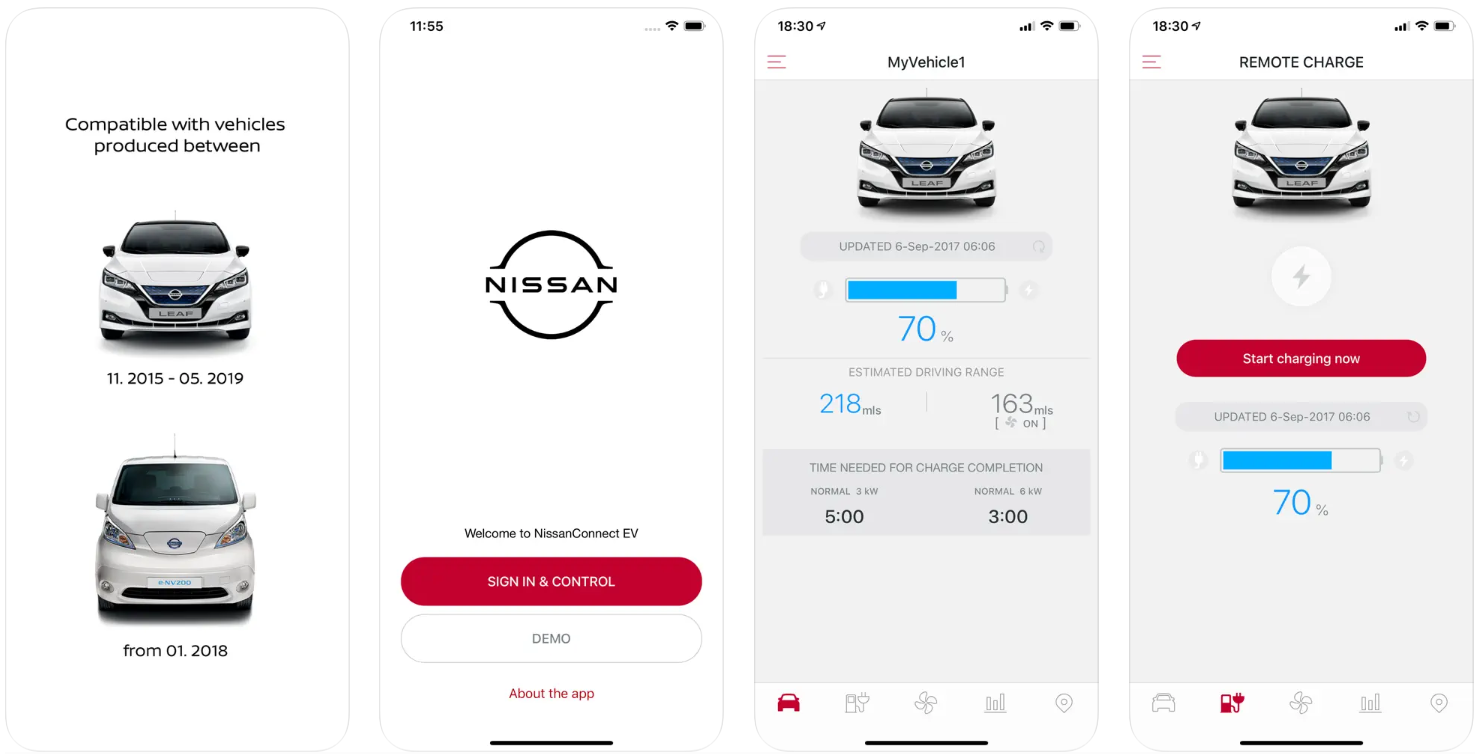
NissanConnect EV features:
- view the battery level
- start charging
- remote climate control
- revision of the projected power reserve
- checking the status of charging completion
Contact information:
- Website: www.nissan.ua
- App Store: apps.apple.com/gb/app/nissanconnect-ev/id407497029
- Google Play: play.google.com/store/apps/details?id=com.digitas.android.nissan.carwings
- E-mail: [email protected]
- Facebook: www.facebook.com/nissan.ua
- LinkedIn: www.linkedin.com/company/nissanua
- Instagram: www.instagram.com/nissan_ukraine
- Address: 8 RUE JEAN-PIERRE TIMBAUD 78180 MONTIGNY-LE-BRETONNEUX France
- Phone number: 0 800 303 307

17. Chargefox
Chargefox is more suitable for those looking for charging stations in the city or planning a trip outside the city. The app covers many operators and allows you to find charging stations of different networks within one platform. For drivers from Ukraine travelling, for example, to Australia or using the services of foreign charging networks, this can be a convenient option. At the same time, the interface itself is quite simple, without unnecessary overload of functions.
The app allows you to track the availability of charging points in real time, pay for charging contactlessly via your phone, and save your favourite stations. The app also provides route navigation based on available charging points, which helps to avoid situations when charging is busy. This is a handy feature for daily commutes and long-distance journeys where network coverage stability is important.
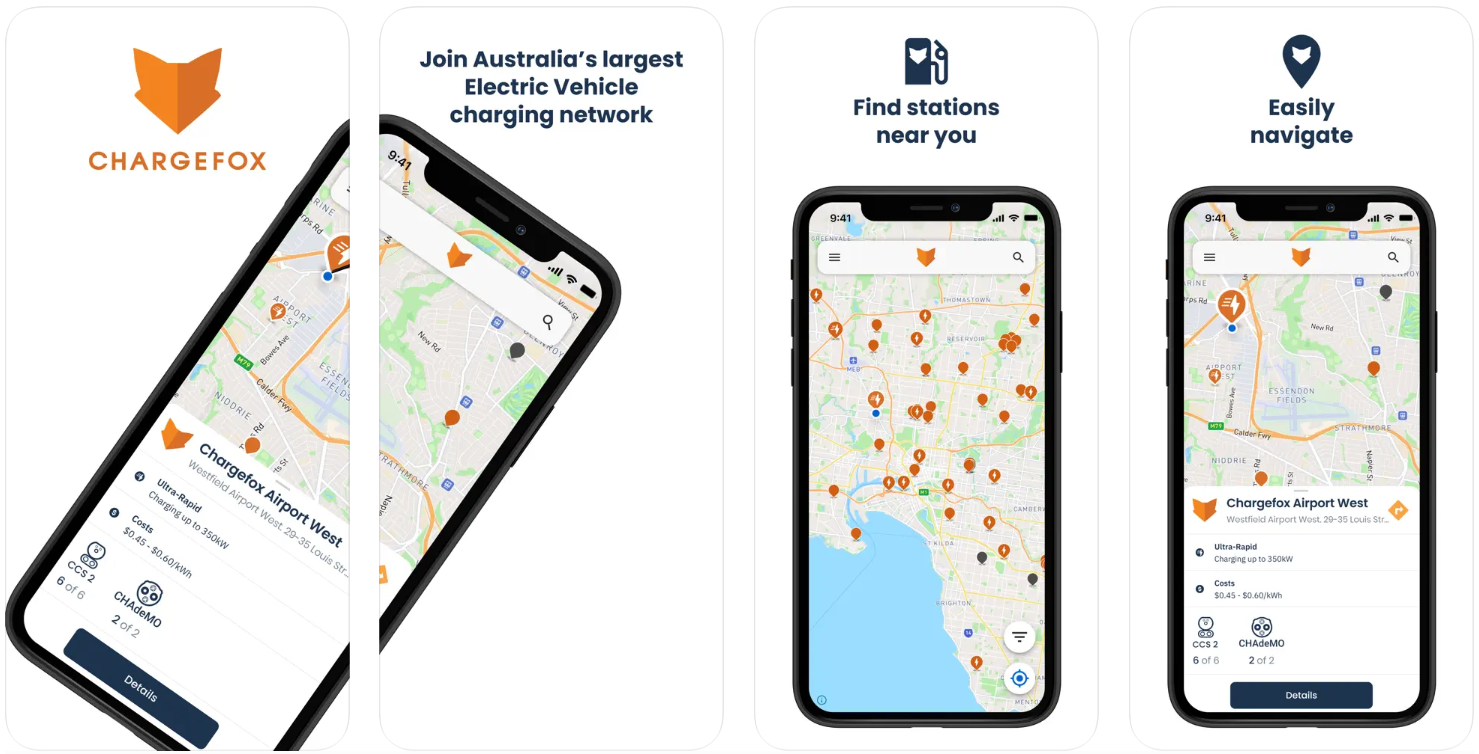
What Chargefox gives:
- map of charging stations from different operators
- payment through the application
- display of free and occupied points
- planning routes with charging points
- push notifications about charging status and updates
Contact information:
- Website: www.chargefox.com
- App Store: apps.apple.com/ua/app/chargefox-ev-charging-network/id1293614477
- Google Play: play.google.com/store/apps/details?id=com.chargefox.android
- E-mail: [email protected]
- Facebook: www.facebook.com/chargefox
- Twitter: x.com/Chargefox
- LinkedIn: www.linkedin.com/company/chargefox
- Instagram: www.instagram.com/chargefox
- Address: L 4 473 Bourke St Melbourne VIC 3000 Australia
- Phone number: +61 422 080 406
18. Charging stations (Navigation Wear)
This app is aimed at those who are looking for a wide range of charging stations in different countries and are not tied to one brand. It offers a large list of charging networks, from Tesla Supercharger to Shell Recharge, and also finds stations that support different types of plugs, including CHAdeMO, CCS, Type 2, and even electric bike plugs. A special mention should be made of the built-in support for charge-aware routing, a feature that can save time and nerves on the road.
At the same time, the app is not flawless. Users complain about the absence of many real stations, technical glitches, and difficulties with payment. There are also negative reviews about the paid subscription, which does not always work properly. So, although it looks good functionally, you should use it with caution and check the information on the spot.
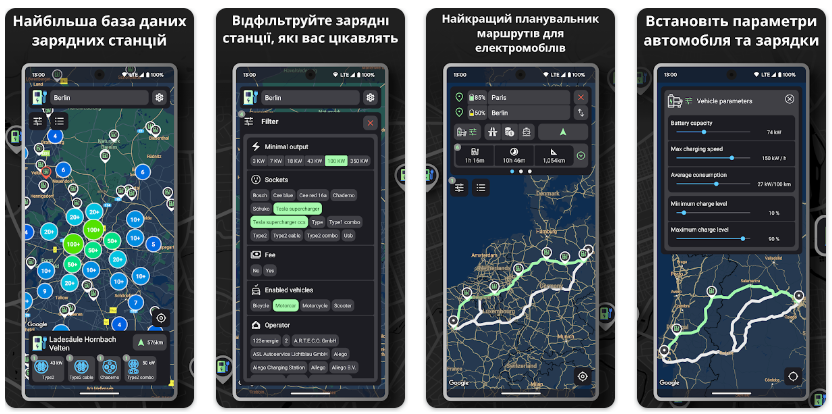
What Navigation Wear supports:
- filtering by type of socket and vehicle
- integration with Google Maps to search for stations
- route planning based on charge
- support for networks: Tesla, Ionity, Lidl, Allego, EVgo, Pod Point and others
- list of popular car models and compatible chargers
Contact information:
- Google Play: play.google.com/store/apps/details?id=com.headupnav.chargingstations
- E-mail: [email protected]
- Address: 911/3 Lermontovova 81105 Bratislava, Slovakia
- Phone number: +421 950 407 704
Conclusions.
When charging an electric vehicle is a hassle-free experience, the journey becomes more relaxed. A convenient smartphone app allows you not only to find a free socket, but also to plan your trip, avoid delays and calculate costs. In this list, we have collected very different solutions: from local Ukrainian apps like ECOFACTOR to global platforms like PlugShare or ABRP. Each of them has its own purpose, strengths, and limitations. Some people need a minimum of functions and charging without registration, while others want full integration with the car, history and remote control.
The most important thing is to choose what works for you. It's worth having several apps for different situations to be prepared for both travelling across Europe and the usual route within the city. In most cases, the experience of other drivers, photos of stations, filters by parameters, and support for payment from your phone have already become standard. Therefore, the main thing here is not the number of functions, but how quickly you can find a charger, connect and drive on.


