


Table of contents:
Switching to an electric car changes the way you think about a route right from the start. It’s no longer just “fill up and go” — now it’s “where’s the next charger, does the connector fit, how many kilometers are left, and is there even anything nearby besides a field?” That’s exactly why route-planning apps have become practically essential for anyone driving an EV.
Fortunately, more of these tools appear every year — and they keep getting smarter. They factor in remaining charge, pull in charging stations in real time, suggest when to stop, and even tell you whether a charger is working. But not all of them are equally convenient for drivers in Ukraine. That’s why we’ve put together a list of the most useful apps that genuinely work both here and abroad.
As a reminder, you can purchase home and commercial charging stations from our online store, as well as use the public ECOFACTOR charging stations located throughout Ukraine. For convenient access to the charging infrastructure, we recommend using our mobile app, available on iOS and Android.

1. ECOFACTOR EV Charging
ECOFACTOR EV Charging is an app for EV drivers that combines station search, trip planning, charging management, and payment.
It can be used both for everyday trips around the city and for journeys between cities or abroad. The driver doesn’t need to open a separate map, look up an operator’s website, check the connector type, and switch to yet another service to pay. The core actions are available in a single app.
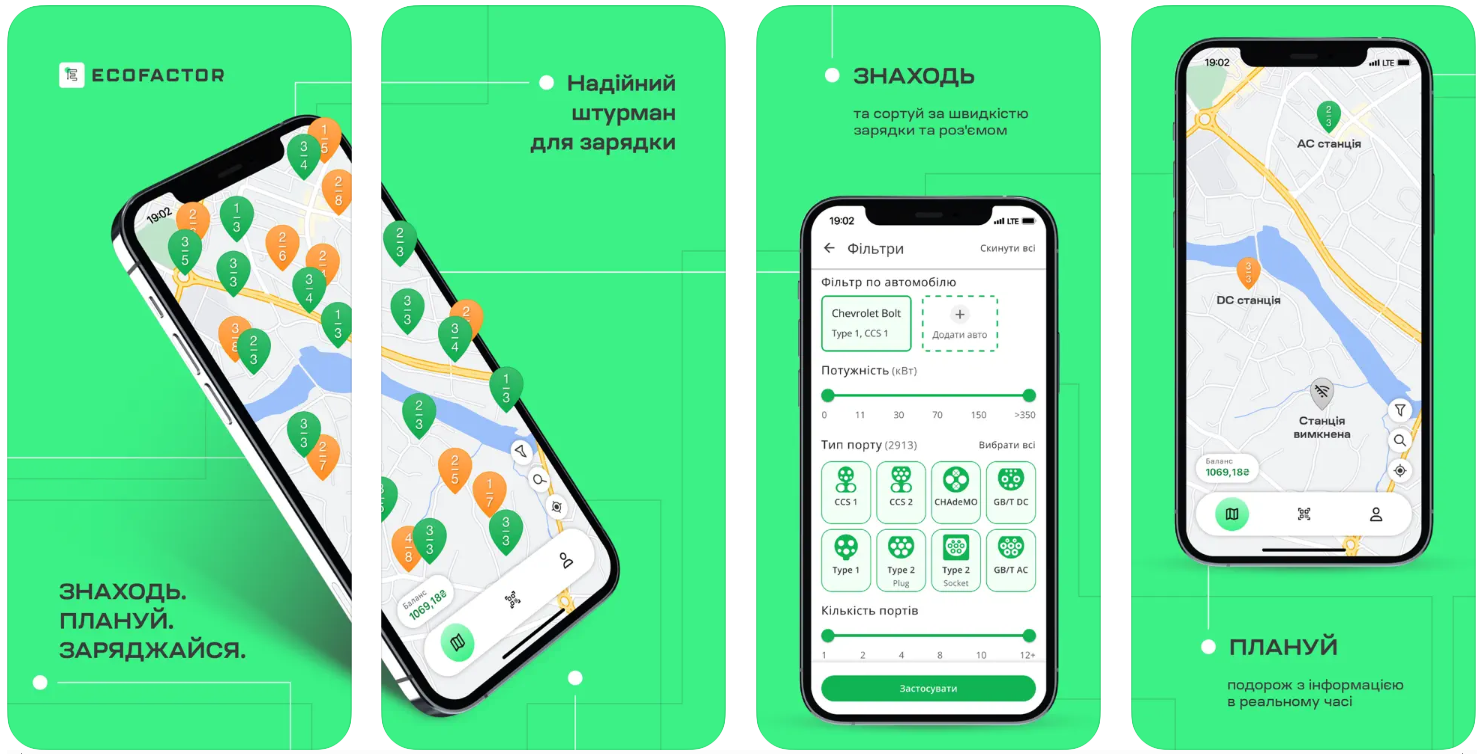
According to ECOFACTOR’s official description, users can view stations on an interactive map, filter them by connector and availability, check the status of individual ports, start and stop a charging session, track the session, and reserve a charging port in advance.
Charging station map
The main ECOFACTOR screen features a map of charging stations. It helps you quickly assess the available infrastructure nearby or along a planned route. On the map you can:
- find the nearest charging stations;
- view stations in another city or country;
- estimate the distance to a charger;
- open the details page for a specific station;
- check the available connectors;
- see the station’s status;
- build a route to the selected point;
- save a convenient station for future trips.
This is useful even before you set off. A driver can open the app at home, check the upcoming route, and choose a primary and a backup charger in advance.
Connector type filters
Not every charging station fits every electric car. That’s why one of ECOFACTOR’s most important tools is filtering by connector type. The app supports searching by these common standards:
- Type 1;
- Type 2 Plug;
- Type 2 Socket;
- CCS1;
- CCS2;
- CHAdeMO;
- GB/T AC;
- GB/T DC;
- NACS DC.
The exact set of available connectors depends on the specific station. On a station’s details page you can check which connectors are installed and whether the port you need is available. This reduces the risk of arriving at a charger that physically doesn’t fit your car. The driver immediately sees only the options that match their needs.
Search by power output
The same battery can take several hours to charge on a slow AC station or charge significantly faster on a suitable DC charger. That’s why it’s important to consider not just the connector, but also the power output when searching.
In the app, you can filter charging points by speed and power. The official Google Play description lists example stations rated at 7, 9, 22, and 50 kW. The actual available power depends on the equipment, the connector, the car, and the conditions of the specific session.
For everyday charging near home, work, or a shopping center, an AC station may be enough. On a long trip, a driver more often needs a fast DC charger to shorten the length of the stop.
Real-time station status
A charger marked on the map doesn’t necessarily mean you can use it right now. A station may be occupied, unavailable, or have only one free connector. ECOFACTOR shows the current status of stations and individual ports. Before heading out, a driver can check:
- whether the station is available;
- whether the needed connector is working;
- whether it’s already in use by another car;
- whether charging can be started;
- whether it’s worth choosing a different point.
Real-time status display is especially important on the highway or in areas where charging stations are scarce. It helps you avoid spending range on a trip to a charger that’s occupied or unavailable.
Reserving a charging port
In ECOFACTOR, you can reserve a charging port ahead of arrival. Standard short-term reservation is available 15 minutes before charging begins.
This feature is handy when a driver is already nearby and wants to reduce the risk of the needed connector being taken before they arrive. The app also offers advance station booking for a chosen time without prepayment, if supported by the relevant charging point.
Reservations are especially useful:
- during peak hours;
- before setting out on the highway;
- at stations with few ports;
- on trips with a tight schedule;
- when remaining charge doesn’t allow for a long search for alternatives.
Before booking, it’s worth checking the specific station’s terms and arriving on time.
Building a route to a charging station
After choosing a charger, a driver can build a route to it. This lets you move from station search straight to navigation without having to copy the address manually. While planning a trip, you can view charging points along the way and pick a stop based on:
- direction of travel;
- distance to the station;
- connector type;
- available power;
- current status;
- reservation availability;
- planned stop duration.
The app’s official description also mentions the ability to build a route with charging stops and allocate time for rest.
Starting and stopping charging from your phone
Once the car is plugged in, a charging session can be started through the app. The driver doesn’t need to find a separate terminal or take extra steps on a third-party website.
Depending on the station, the process looks like this:
1. The driver opens the station’s details page.
2. Selects the needed connector.
3. Plugs the cable into the car.
4. Taps the button to start charging.
5. Monitors the process in the app.
6. Stops the session once it’s done.
7. Unplugs the cable following the instructions.
ECOFACTOR lets you start and stop charging from your smartphone, as well as control the active session in real time.
Monitoring a charging session
Once charging begins, the app shows information about the active session. The driver doesn’t have to stay by the car the whole time. In the app, you can monitor:
- charging status;
- session progress;
- energy delivered;
- current cost;
- charging duration;
- estimated completion time;
- the option to stop remotely.
This is convenient when the station is located near a café, shop, hotel, or another place where you can spend time while the car charges.
In-app payment
ECOFACTOR lets you pay for charging directly through the app. The official description mentions support for bank cards, Apple Pay, and Google Pay. Other payment methods may also be used on the platform depending on the market and specific implementation. The driver doesn’t need to:
- look for a cashier;
- install a separate app for every session;
- enter payment details before every charge;
- keep paper receipts;
- track expenses separately.
Before starting a session, you can check the station’s rate. The final cost depends on the amount of energy received, the operator’s rate, and any additional conditions, such as an idle fee after charging is complete.
Automatic balance top-up
ECOFACTOR offers automatic balance top-up. The user links a bank card, chooses an amount, and sets a minimum threshold.
When the balance drops below the set level, the system can top it up automatically. This helps avoid a situation where a driver has already plugged in the car but can’t start charging due to an insufficient account balance.
The feature is especially convenient for those who regularly use public stations and don’t want to check their balance manually every time.
Charging history
All completed sessions can be viewed in the history. This lets you see not just individual payments, but also an overall picture of your public charging usage. The history helps you check:
- the date of charging;
- the station used;
- the session duration;
- the amount of energy received;
- expenses;
- charging frequency;
- recurring routes.
For a private driver, this is a convenient way to track EV-related expenses. For someone managing multiple cars or a corporate fleet, the history helps you better understand usage patterns and plan future sessions.
ECOFACTOR officially states that it supports charging history and clear analytics.
Saving favorite stations
If a driver regularly charges at the same locations, stations can be added to favorites. This helps you more quickly:
- check the availability of your usual charger;
- open the needed station without searching the map;
- build a route to it;
- check the connector’s status;
- see changes to the station’s operation.
Push notifications about availability may also be used for favorite points. For example, the app can notify you when the charger you need becomes free.
Notifications
It’s not always convenient to keep the app open the whole time you’re charging. Push notifications help you keep track of important changes. Depending on the event, a user may receive a message about:
- a change in the charging session’s status;
- charging completion;
- the availability of a chosen station;
- new charging points;
- network updates;
- the need to check the active session.
These notifications help you return to your car in time and free up the charging spot once the process is complete.
24/7 support
Even with proper preparation, various situations can arise: a station won’t start, a connector won’t detach, a payment doesn’t go through, or a session displays incorrectly.
In the ECOFACTOR app, you can contact the support team. It operates around the clock and helps you check the equipment’s condition, sort out a session, or find the nearest alternative station.
Access to support directly from the app is especially important during night trips, on the highway, or in an unfamiliar city.
Quick registration
To access all features, a user registers with a phone number. After logging in, the following become available:
- station search;
- status viewing;
- starting charging;
- payment;
- reservations;
- session history;
- balance management;
- contacting support.
ECOFACTOR’s official page describes quick SMS-based registration and phone-number login.
Support for multiple vehicles
ECOFACTOR supports profile management for private users and organizations. In the relevant configurations, you can add several vehicles, grant access to other drivers, and control charging sessions. This can be useful for:
- a family with several electric cars;
- a company with a fleet of service vehicles;
- a delivery service;
- taxis;
- a rental fleet;
- a business with corporate charging infrastructure.
The ECOFACTOR platform also supports multi-user profiles, shared vehicle access, and fleet management tools.
Plug’n’Charge and RFID
On compatible equipment, ECOFACTOR can support Plug’n’Charge — a scenario where charging starts with minimal additional steps after the car is plugged in.
Users can also order an RFID card through the app or website. It can serve as an extra authorization method at compatible charging stations. According to ECOFACTOR, card delivery takes roughly three to five business days.
It’s handy to have an RFID card as a backup option, especially while traveling or in areas with unstable mobile coverage.
CarPlay and Android Auto
The ECOFACTOR platform states support for Apple CarPlay and Android Auto. This lets you use part of the functionality through the car’s infotainment system without being distracted by your phone screen.
Supported capabilities may depend on the phone model, the car, the operating system version, and the current app version.
Transparent pricing
Before charging begins, it’s important to understand exactly what you’re paying for. ECOFACTOR states transparent pricing with no hidden fees and automatic cost calculation based on the set rate. Before starting a session, it’s worth checking:
- the cost per kWh;
- a possible time-based fee;
- the idle fee;
- parking conditions;
- the rules of the specific location;
- your available balance;
- the payment method.
This is especially important at stations located in paid parking lots or areas with specific stay regulations.
Working in Ukraine and abroad
ECOFACTOR isn’t focused solely on Ukrainian routes. The app helps you find charging stations in Ukraine, Europe, and Central Asia.
ECOFACTOR’s official materials point to a broad geography of available charging points and the ability to plan trips outside Ukraine. The number of stations and the availability of certain features may vary depending on the country, operator, and partner network.
Before an international trip, it’s worth checking separately:
- whether payment is available in the country you’re visiting;
- which currency the rate is displayed in;
- which operators are supported;
- whether additional registration is required;
- whether reservations work;
- which connectors are common along the route;
- whether you’ll need your own cable.
How to start charging through ECOFACTOR
The process consists of several steps.
1. Download the app
ECOFACTOR EV Charging is available for Android and iOS devices.
2. Register
Enter your phone number, confirm it via SMS, and log into your profile.
3. Add a payment method
Link a bank card or choose another available payment method. Set up automatic top-up if needed.
4. Find a station
Open the map, allow location access, or manually select the area you need.
5. Set your filters
Choose the connector type, the power you need, and other parameters.
6. Check the station’s details
Pay attention to the address, status, available connectors, power, and rate.
7. Build a route
Switch to navigation and head to the selected point.
8. Reserve a connector
Once you’re nearby, use short-term reservation if it’s available.
9. Plug in the car
Park near the needed port and connect the cable following the station’s instructions.
10. Start the session
Select the connector in the app and press the start button.
11. Monitor charging
Check the progress, energy delivered, duration, and cost in the app.
12. Finish the session
Stop charging, wait for the connector to unlock, and unplug the cable.
ECOFACTOR’s official page describes the basic process as registration, finding a compatible point, starting a charge, and contacting support if needed.
How to choose a charging station in the app
The nearest charger isn’t always the most convenient one. Before a trip, it’s worth checking a few parameters.
Connector type
It should match your car or the cable you have with you.
Power
A station’s high stated power doesn’t guarantee the car will accept it in full. Maximum speed depends on the EV’s own capabilities, its charge level, battery temperature, and other conditions.
Status
Check whether the station is working and whether the port you need is free.
Number of connectors
A station with several compatible ports gives you a better chance of starting to charge without waiting.
Rate
Compare the cost of energy and any additional fees.
Location
For a longer session, it’s more convenient to choose points near a café, shop, hotel, restroom, or rest area.
Backup station
Even when your primary charger is available, it’s useful to know where the nearest alternative is located.

2. Google Maps
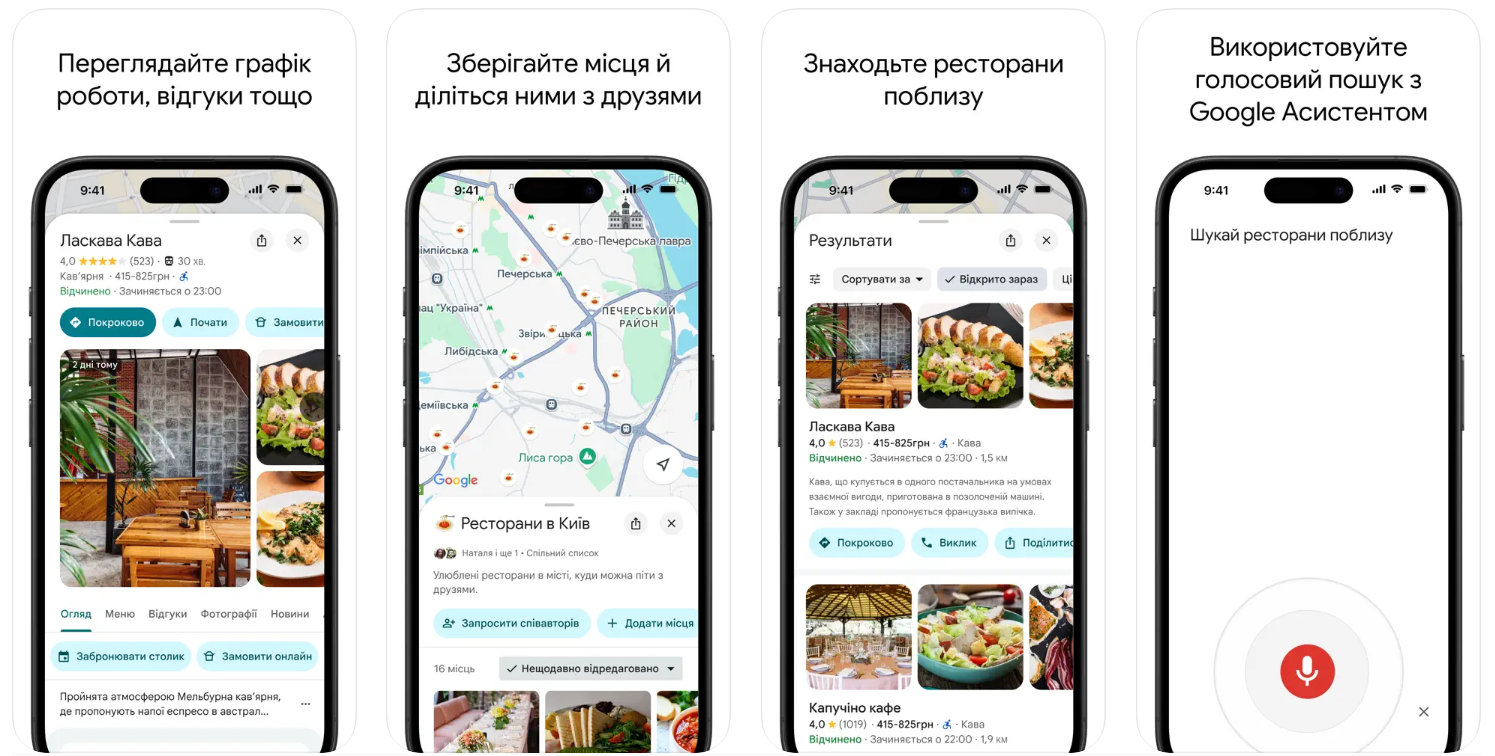
Google Maps is known to practically everyone, and it’s hard to find a person who hasn’t used this app at least once. But when it comes to EV routes, things get a bit more complicated. Its main advantage is the sheer amount of up-to-date data: traffic jams, roadwork, closed sections — all of it is factored in automatically. Navigation adapts to road conditions, adjusting the route in real time. There’s also a fuel-saving mode that can be used to calculate the most efficient path.
However, the app wasn’t built exclusively for electric cars. It lacks deep integration with charging station networks, so users have to look for these points themselves or use additional services. This can be inconvenient, especially on a long trip, where it matters not just where a charger is located, but also its compatibility, speed, and availability.
As a general-purpose navigator, Google Maps is quite reliable, but EV drivers may find it lacking in specific functionality. Still, for short trips around the city, where there’s enough range and no charging stop is planned, the app does its job without unnecessary complications.
Contact information:
- Website: www.google.com/maps/about
- App Store: apps.apple.com/us/app/google-maps/id585027354
- Google Play: play.google.com/store/apps/details?id=com.google.android.apps.maps
- Facebook: www.facebook.com/googleworkspace
- Twitter: x.com/googleworkspace
- LinkedIn: www.linkedin.com/showcase/googleworkspace
- Instagram: www.instagram.com/googleworkspace
- Address: 1600 Amphitheatre Pkwy, Mountain View, California 94043, USA

3. PlugShare
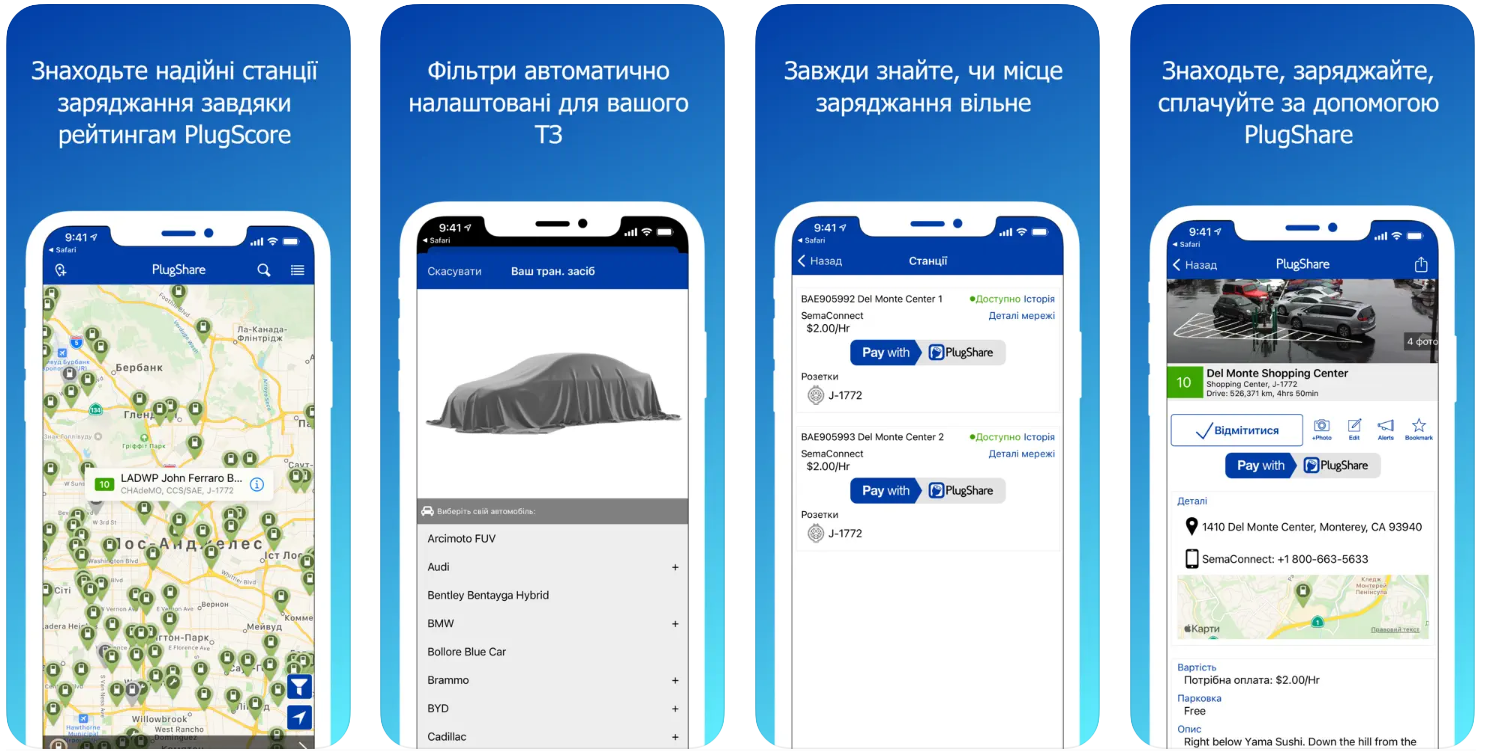
PlugShare isn’t just a map of chargers — it’s an entire community of EV drivers who share reviews, photos, and their own observations about stations. You can find charging points by connector type, speed, availability, or even by whether there’s a restroom or café nearby. The app has a convenient filter that lets you immediately rule out irrelevant options. And if a stop is new, a driver can add it to the map themselves.
This app is especially handy for frequent travelers. There’s a route-planning feature that accounts for charging stations along the way, plus integration with other navigation apps. You can also enable notifications about new chargers appearing in a chosen region, which is useful if you often take the same routes.
PlugShare works best as a companion to your main navigation app. It’s handy to have on hand to quickly check whether a charger is working, how much charging costs, and whether there have been any recent issues. For Ukraine, a key advantage is support for local providers, including YASNO, TOKA, and AutoEnterprise, which makes things much easier for local drivers.
Contact information:
- Website: www.plugshare.com
- App Store: apps.apple.com/us/app/plugshare-ev-charging/id421788217
- Google Play: play.google.com/store/apps/details?id=com.xatori.Plugshare
- E-mail: [email protected]
- Facebook: www.facebook.com/plugshare
- Twitter: x.com/plugshare
- LinkedIn: www.linkedin.com/company/plugshare
- Instagram: www.instagram.com/plugshare

4. Waze
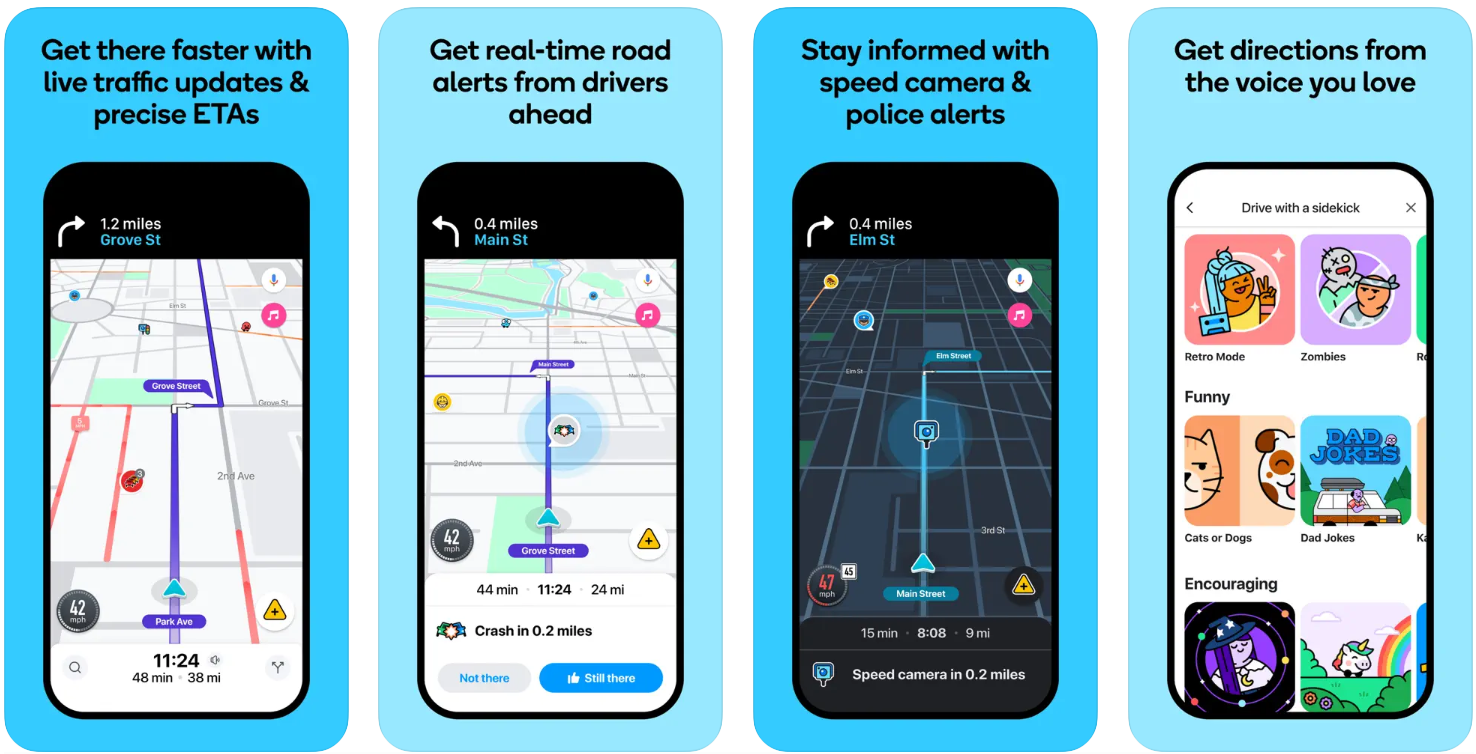
Waze is a navigation app many drivers value for letting them see what’s happening on the road before it catches them off guard. The app constantly updates data based on user reports: traffic jams, accidents, roadwork, police, potholes, speed limits — all of it appears on the map in real time. This is useful not only in big cities, but also on highways, where you can’t always find out about obstacles right away.
When it comes to electric cars, Waze isn’t quite tailored for them yet. You can find charging stations along a route in the app, but you can’t filter them by connector type or power. For EV owners this can be critical, especially when there are only a few options and charging time matters. Some users also complain about unstable CarPlay integration and difficult access to settings while driving.
Despite these limitations, Waze remains a good tool for avoiding surprises on the road. Its main strength lies in its social element, where drivers share information with each other. But for full-fledged EV trip planning that accounts for charging, this app is better paired with more specialized solutions.
Contact information:
- Website: www.waze.com
- App Store: apps.apple.com/us/app/waze-navigation-live-traffic/id323229106
- Google Play: play.google.com/store/apps/details?id=com.waze
- Facebook: www.facebook.com/Waze
- Twitter: x.com/waze
- LinkedIn: www.linkedin.com/company/waze
- Instagram: www.instagram.com/waze
5. Sygic
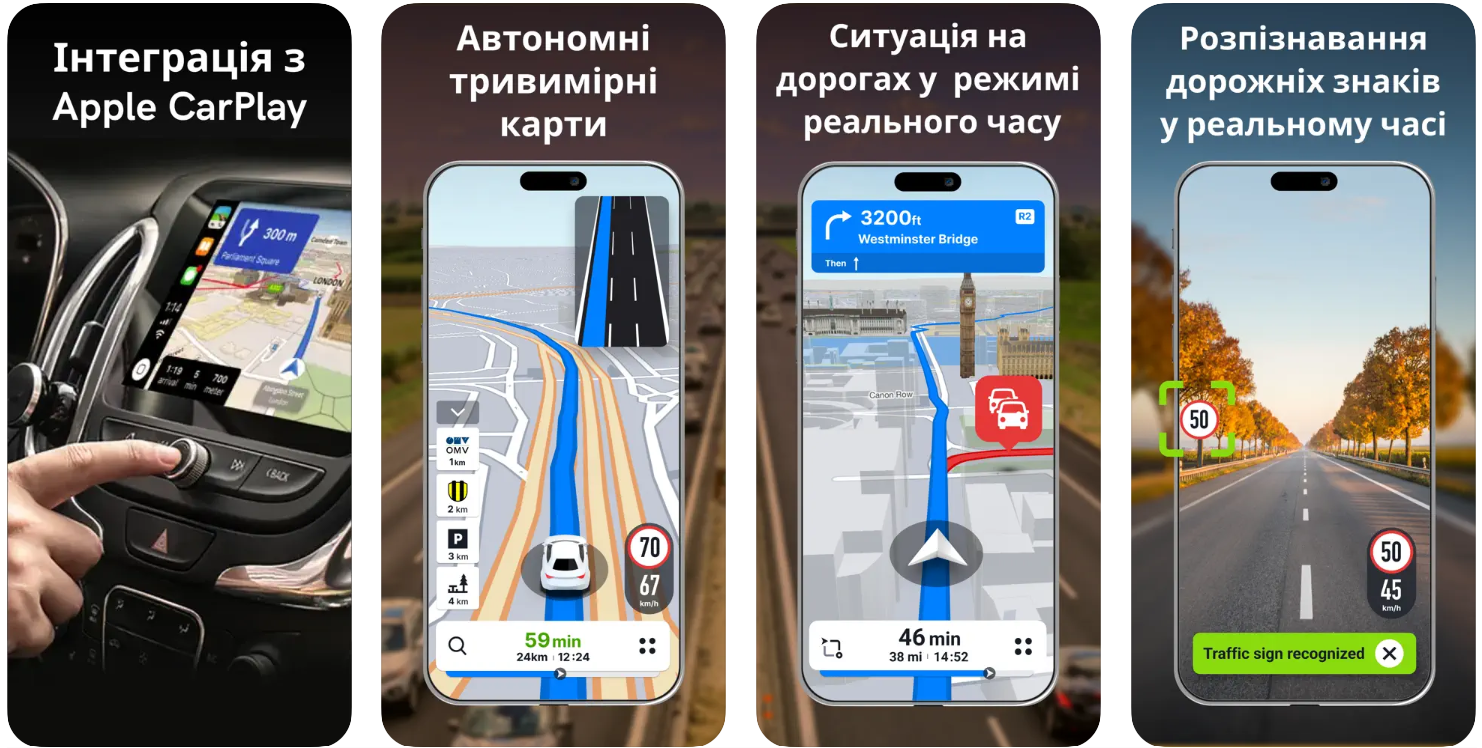
Sygic is an offline navigator focused on autonomy and safety, suited to those who often drive outside stable mobile coverage. In the app, you can download maps in advance and use voice navigation and 3D maps. For EV drivers, it’s notable that Sygic lets you set your fuel type and displays charging stations, though full EV-feature integration is still developing.
One of the app’s notable strengths is a large set of additional features not often found in other apps. For example, HUD projection of navigation onto the windshield, realistic augmented-reality route overlays via the phone camera, a Dashcam feature, and real-time road-sign detection. These capabilities are more focused on driving comfort than on EV-specific needs, but they can be useful to drivers of any car.
Sygic suits those who want a comprehensive solution on hand, even if some EV features don’t yet match specialized services. For long trips with a predetermined route, where precise navigation and stable offline operation are needed, this app can be a practical choice. But as a primary route planner for an electric car, it’s more of a helper.
Contact information:
- Website: www.sygic.com
- App Store: apps.apple.com/us/app/sygic-gps-navigation-maps/id585193266
- Google Play: play.google.com/store/apps/details?id=com.sygic.aura
- Facebook: www.facebook.com/sygicofficial
- Twitter: x.com/sygicofficial
- LinkedIn: www.linkedin.com/company/sygic

6. Apple Maps
Apple Maps is a basic navigation app for iOS devices, suitable for everyday trips or getting around a city. The app offers turn-by-turn navigation, supports driving, cycling, walking, and public transit, and provides real-time traffic, congestion, and accident information. Users can download offline maps, which is handy in places without a stable internet connection. Place updates, business hours, reviews, and photos are also available directly in the app.
In terms of EV route planning, Apple Maps still has limited functionality. The app doesn’t let you filter charging stations by connector type or charging speed, and it doesn’t integrate with most local providers. It also doesn’t let you plan a route in advance that accounts for charging stops or battery level. This creates certain difficulties for users who drive not just around town, but also long distances.
For those within the Apple ecosystem who don’t have high demands for planning flexibility, Apple Maps can be a convenient choice. But EV drivers who want more control, better integration with charging infrastructure, and the ability to adapt a route will need to use additional tools or other navigation services.

Contact information:
- Website: maps.apple.com
- App Store: apps.apple.com/us/app/maps/id915056765
- Facebook: www.facebook.com/apple
- Twitter: x.com/apple
- LinkedIn: www.linkedin.com/company/apple
- Instagram: www.instagram.com/apple

7. OsmAnd
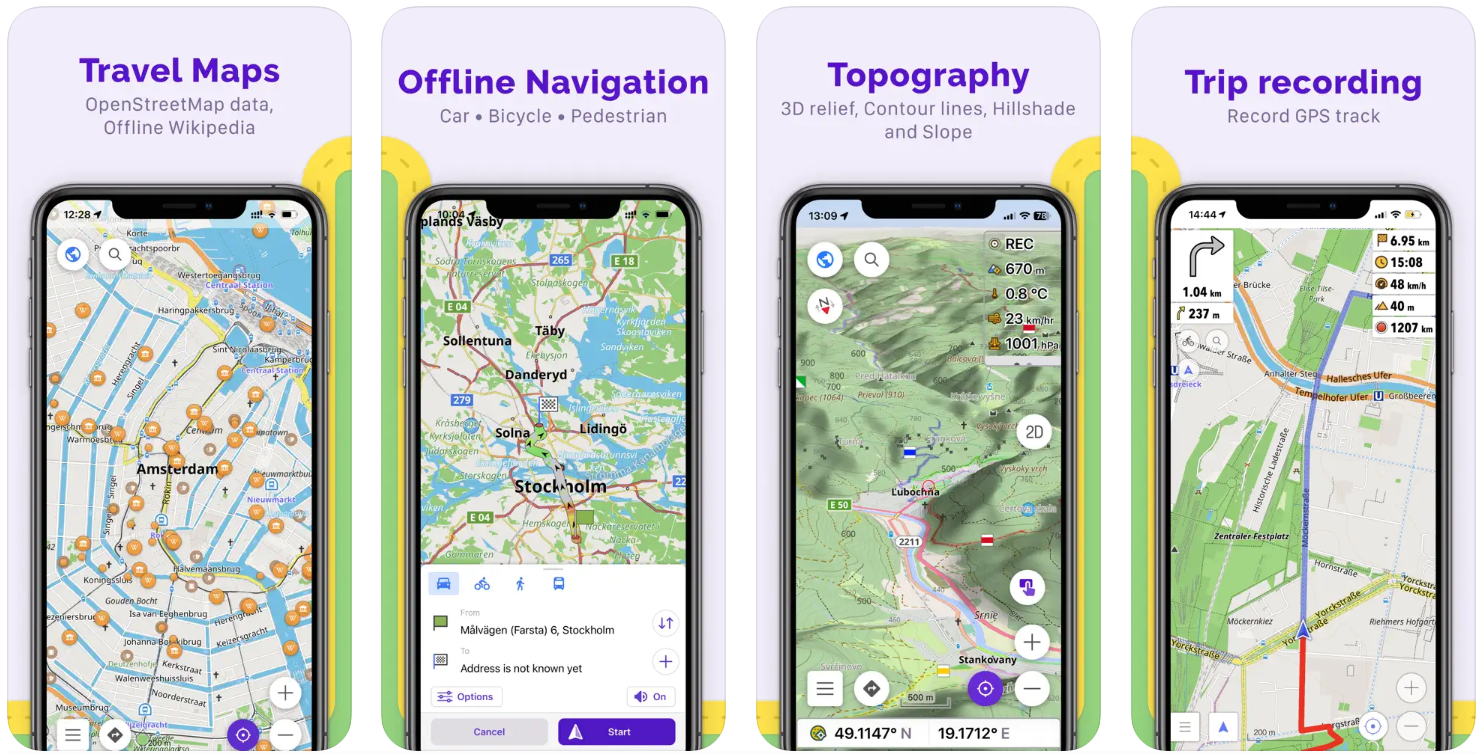
OsmAnd is an open-source navigation app focused primarily on offline use. Drivers can download maps for any region of the world, build routes without an internet connection, and even manually adjust a planned route to exclude certain types of roads. The app supports many modes of transport, including cars, bicycles, motorcycles, and walking, and lets you tailor a route to your vehicle’s specifics or road conditions.
For EV drivers, this app is interesting for its ability to display points of interest that can be adapted for charging stations, although there’s no direct EV-infrastructure support or integration with charging operators. On the other hand, OsmAnd lets you save your own GPX tracks, build a route accounting for elevation, keep trip statistics, and see a detailed elevation profile with climbs and descents. For experienced users, this can even be more convenient than classic online navigators.
This app suits those who want full control over their map, don’t depend on the internet, and value deep customization. OsmAnd leans more toward tourists, expeditions, or bike touring, but with some effort it can also be adapted for EV trips — though that requires more manual work.
Contact information:
- Website: osmand.net
- App Store: apps.apple.com/us/app/osmand-maps-travel-navigate/id934850257
- Google Play: play.google.com/store/apps/details?id=net.osmand
- Facebook: www.facebook.com/osmandapp
- Twitter: x.com/osmandapp
- E-mail: [email protected]

8. Petal Maps
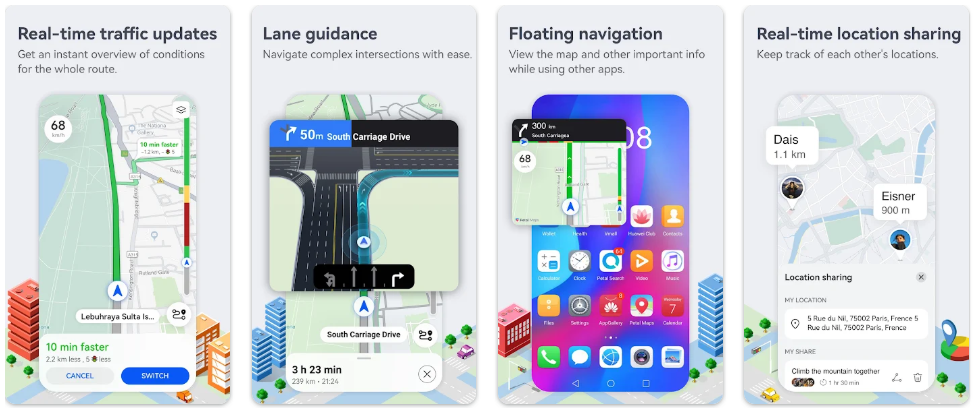
Petal Maps is a navigation app from Huawei that has become available on many devices and covers most of the popular features, including real-time navigation, support for several transport modes, and the ability to download offline maps. The app lets you add stops to a route, report police or accidents, use voice search, and sync data across devices. It has basic features for EV users, including finding charging stations along a route.
That said, electric cars aren’t a development priority. The app has no filtering of stations by connector type, speed, or operator. There’s also no feature for planning a route based on battery charge or reserving a charger in advance. Users will need to check the details themselves or use additional services. It’s worth noting that some users complain about the large size of map downloads, which can be a problem for devices with limited storage.
Petal Maps is better suited for everyday trips around the city or as an alternative to Google Maps on Huawei devices. For EV drivers, the app can be useful as basic navigation, but for long trips requiring careful charging planning, its functionality won’t be enough.
Contact information:
- Website: www.petalmaps.com
- Google Play: play.google.com/store/apps/details?id=com.huawei.maps.app
- E-mail: [email protected]
Summary
For an EV driver, a route isn’t just roads and turns. You need to account for remaining range, connector type, station power, its availability, and the time needed to charge.
ECOFACTOR helps bring all these actions together in one app. Through it, you can find a compatible charging point, check a port’s status, build a route, reserve a spot, start charging, pay for it, and monitor the session from your phone.
For general road navigation, you can additionally use Google Maps, Waze, Apple Maps, or another familiar service. But it’s the specialized app that gives a driver more control over charging.
Before a long trip, it’s worth checking your route, choosing primary and backup stations, preparing a payment method, and downloading an offline map. Then a charging stop becomes a normal part of the journey rather than an unpredictable problem.
Frequently Asked Questions
What is ECOFACTOR EV Charging?
ECOFACTOR EV Charging is an app for finding charging stations, planning a route, starting charging, and paying for it.
Where can I download ECOFACTOR?
The app is available on the App Store and Google Play.
Do I need to register?
To fully access charging, payment, reservations, and session history, you need to create an account. Registration is done using your phone number.
How do I find a compatible charger?
Open the map and apply the filter for your car’s connector type. Also check the power, status, and availability of a specific port.
Does ECOFACTOR show whether a station is occupied?
Yes. In the app, you can check the status of a station and its individual connectors in real time.
Can I reserve a charger?
Yes. ECOFACTOR supports reserving a port 15 minutes before arrival. Advance booking for a chosen time may also be available for some stations.
Can I start charging from my phone?
Yes. Once you’ve selected a station and plugged in the car, you can start the session through the app.