

Table of contents:
Polestar is not just an electric car, but part of a digital ecosystem that unfolds through apps. In 2025, the choice of solutions for Polestar owners became even wider: from navigation and finding charging stations to monitoring the car’s condition and planning trips. This article has gathered the most useful apps that truly improve the Polestar driving experience in Ukraine and beyond.
We remind you that you can purchase home and commercial charging stations in our online store and also use the public charging stations ECOFACTOR charging points located throughout Ukraine. For convenient access to charging infrastructure, we recommend using our mobile application which is available on iOS and Android.
1. ECOFACTOR EV Charging
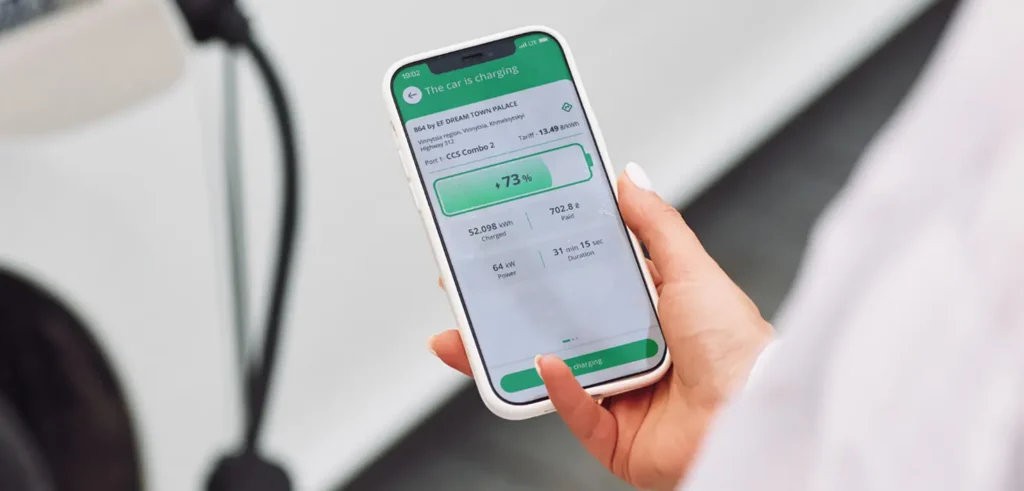
We created the ECOFACTOR EV Charging app to make the process of charging an electric vehicle easier and more convenient for drivers in Ukraine, Europe and Central Asia. In the app, you can find charging stations by location, connector type, power level and availability. Users can check the station’s status in real time, start and stop charging remotely, and view session and cost history. The reservation function allows users to reserve a station 15 minutes before arrival, which helps to avoid waiting.
We also support convenient payment options – via Apple Pay, Google Pay or bank card. For trip planning, the app offers charging points along the route with the ability to filter by charging speed and connector type. All features are designed to make charging comfortable both during daily commutes and long journeys. Additionally, the app has a built-in support service that responds quickly to requests. The app is available for iOS and Android.
In addition to the mobile app, we also produce charging stations in Ukraine in accordance with European quality standards, which enables us to supply products to the US and other markets. Through our ECOFACTOR online store users can purchase cables, adapters for switching from a single-phase to a three-phase socket, as well as charging stations for home and commercial use.
Key points:
- Search and filter charging stations by power and connector type
- Check the availability of charging points in real time
- Possibility to book stations 15 minutes before arrival
- Payment via Apple Pay, Google Pay or bank card
- Remote control of the charging process from the app
- Real-time monitoring of the charging process and viewing of session history
- Planning routes with charging stops
- Built-in support service in the application
Who is best suited:
- For drivers in Ukraine and Europe looking for charging stations
- For users who want to avoid queues and disruptions during charging
- For those who frequently travel or charge on the go
- For users who appreciate convenient payment and a simple interface
- For owners of electric vehicles with different types of connectors

2. Optiwatt
Optiwatt enables electric car owners to automatically charge their vehicles during the most economical and environmentally friendly hours of the day. The application connects to the user’s energy tariff, analyses the electricity consumption schedule and determines the optimal time for charging. It also allows you to set the desired charge level and time of departure, ensuring a comfortable temperature in the cabin until the trip.
Users can see exact charging costs, savings compared to petrol and an estimate of CO2 emissions reduction. One-off charging targets can be set for journeys, and Optiwatt automatically returns the charge level to its normal value after the journey is complete. The app is compatible with Polestar and other electric vehicles, including Tesla, Hyundai, Ford, BMW, and others.
Key points:
- Automatic charging during hours with low tariffs
- Display cost, efficiency and savings statistics
- Support for departure schedule and pre-conditioning of the cabin
- Ability to set temporary charging targets for journeys
- Works with any charger
Who is best suited:
- For Polestar owners who charge their cars at home
- For customers with an hourly electricity tariff
- For those who want to reduce charging costs and environmental impact
- For drivers planning trips with high charge levels

3. Waze
Waze is a navigation app with a focus on real-time data coming from the driver community. It warns about traffic jams, police, roadworks, accidents and other obstacles, helping to avoid unwanted stops along the route. The app supports integration with Apple CarPlay, which allows you to use it on the Polestar’s car display.
Waze also offers speeding warnings, shows the fastest routes based on the current traffic situation, and allows you to find the lowest-priced petrol stations. The user community constantly updates information about the traffic situation, making navigation as up-to-date as possible.
Key points:
- Routes taking into account traffic jams, accidents and police
- Integration with CarPlay
- Support for speed alerts
- Ability to search for cheap petrol stations (for hybrid models)
- Voice instructions and personalised navigation
Who is best suited:
- For Polestar owners who frequently drive around the city
- For those who want to avoid traffic jams and fines
- For CarPlay users
- For drivers looking for navigation with live updates

4. PlugShare
PlugShare is an interactive map of charging stations, created based on reviews from electric vehicle drivers. Users can find charging points by connector type, speed, availability of amenities (restroom, cafe) and verify their up-to-date status. For convenience, navigation to the selected point is available through external maps, as well as the ability to pay for charging (at compatible stations).
The app supports integration with CarPlay, which allows you to search for charging points directly from your car’s multimedia system. It also allows you to plan routes with charging points in mind, add your own points to the map, and receive notifications about new charging points nearby. PlugShare supports Polestar and almost all electric vehicles on the market.
Key points:
- Extensive base of charging stations in Europe and the world
- Filters by connector type, speed and convenience
- Ratings, photos and user reviews
- Route planning with charging stations in mind
- CarPlay support and payment via the app
Who is best suited:
- For Polestar owners who charge their cars in the city or when travelling
- For drivers planning routes with intermediate charging
- For those who want to see reviews and verified information about chargers
- For CarPlay users who want to access their charges from the car’s display

5. YouTube Music
YouTube Music allows Polestar drivers to access an extensive library of music, including official tracks, live performances, remixes and unique content not always available on other services. Users can create their own playlists, use personalised recommendations and listen to music by genre or mood. The app also supports downloading files from a device for listening within the same application.
The app is compatible with Android Auto, Google Assistant, Google Maps and Waze, making it easy to control your music while driving without distractions. Users can switch between audio and video modes, view lyrics, and listen to music from smart speakers, TVs, watches, or through the car’s multimedia system. A subscription option is available, which allows you to listen without ads and in the background.
Key points:
- Extensive music database with rare content
- Personalised playlists and recommendations
- Support for Android Auto and voice control
- Upload your own files to the app
- Ability to switch between audio and video
Who is best suited:
- For Polestar drivers who listen to music while driving
- For those who want access to exclusive music content
- For Android Auto or Google Assistant users
- Those who appreciate personalised selections and listening flexibility
6. Android Auto
Android Auto is designed to integrate your smartphone with your car’s multimedia system. Users can launch maps, listen to music, answer calls and messages, and receive voice prompts without having to interact with the phone. The app supports voice control via Google Assistant and helps to avoid unnecessary distractions while driving.
The app works with most popular services, including Spotify, Google Maps, WhatsApp and many others. It provides access to up-to-date traffic information, navigation, calendar of events, messages and news. Connection is via USB or wirelessly, depending on the car and phone. Polestar supports Android Auto, which makes this app a handy tool for your daily commute.
Key points:
- Voice control via Google Assistant
- Integration with the Polestar multimedia system
- Support for music, calls, messages and navigation
- Access to popular apps while travelling
- Simple interface with large buttons
Who is best suited:
- For Polestar drivers with Android smartphones
- For those who want to minimise distractions while driving
- For users of Google services and media applications
- Those who need easy navigation and communication on the go

7. Vivaldi
Vivaldi is a browser for mobile devices with a focus on privacy, customisation and efficient tab management. It includes a built-in ad blocker, protection from tracking, a sync function with other devices, as well as the ability to change themes, wallpapers and the app icon. Polestar owners can use it for quick access to web content with a personalised environment.
The browser supports desktop features, such as a tab bar, dark mode for all sites, and the ability to take notes while browsing. Additional features include saving pages for offline reading and a choice of search engines. Data is synchronised using end-to-end encryption, allowing you to securely work from the same accounts across multiple devices.
Key points:
- Built-in protection against adverts and trackers
- Synchronise data between devices
- Personalise themes, wallpapers and tabs
- Dark mode for all sites
- Ability to take notes and save articles for offline access
Who is best suited:
- For Polestar drivers who use the built-in browser in the car system
- For users who value privacy and flexible settings
- For those who want to synchronise their browser between their phone and PC
- For drivers who read or work with web content on the road
8. Google Maps
Google Maps is one of the most popular navigation apps, offering routing for drivers, pedestrians, cyclists and public transport users. For Polestar drivers, the app provides voice guidance, real-time traffic updates, alternative routes and speed limit tips. The information is regularly updated through user contributions and integration with the location database.
Users can plan trips based on traffic forecasts, find charging stations, hotels, restaurants, and use offline mapping. There are also features such as previewing places through Street View, sharing favourite places, and viewing the traffic congestion at different times. Google Maps integrates with Android Auto and other platforms for easy in-car use.
Key points:
- Voice navigation and real-time traffic
- Search for charging stations and services along the route
- Support for offline maps and Street View
- Sharing access to your favourite places
- Data on seat occupancy and nearby amenities
Who is best suited:
- For Polestar owners who travel frequently
- Drivers who need precise traffic navigation
- For those looking for information about services on the route
- For Android Auto or CarPlay users to integrate with navigation

9. Spotify
Spotify provides access to an extensive library of music, podcasts and audiobooks. Users can create playlists, listen to personalised recommendations and share content with friends. The app also features Spotify Connect, which allows users to stream music to a variety of devices, including cars, smartphones, TVs and smart speakers.
Polestar drivers can use Spotify via Android Auto or Apple CarPlay to listen on the go. The app also supports offline mode in the premium version. Available features include “AI DJ” for automatic track selection, a year’s worth of listening, playlists by genre or mood, and the ability to select favourite artists.
Key points:
- Streaming music, podcasts and audiobooks
- Synchronise between devices
- Offline access in premium mode
- Playlists, recommendations, events and AI DJs
- Integration with Android Auto and Apple CarPlay
Who is best suited:
- For Polestar drivers who listen to music while driving
- For those who want to have content on different devices
- For users who create or share playlists
- For those looking for personalised playlists and audio content
Conclusion
In 2025, Polestar owners will have access to a wide range of apps that make it easier to use their electric vehicle in everyday life. From finding charging stations and planning routes to remotely monitoring the car’s condition and listening to your favourite podcasts, modern apps cover all the key needs of drivers. They not only save time, but also help to better control costs and improve efficiency.
The apps selected in this review cover a variety of Polestar uses and can be equally useful in urban environments and on long journeys. By choosing tools that really work, Polestar drivers gain more convenience, transparency and control over their electric vehicle.