


Table of contents:
Quick Summary: Choosing the right fleet management system requires evaluating your operational needs, budget constraints, required features like GPS tracking and maintenance scheduling, integration capabilities with existing tools, and scalability for future growth. The decision impacts cost efficiency, driver safety, and overall fleet productivity for years to come.
Managing a fleet without modern software feels like navigating with a paper map in the age of GPS. It’s technically possible, but you’re making life harder than it needs to be.
The stress multiplies when you’re tracking dozens of vehicles, coordinating driver schedules, monitoring fuel costs, and ensuring compliance across your operation. Traditional methods just don’t scale.
But here’s the thing: picking the wrong fleet management system can be worse than having none at all. A clunky platform that doesn’t integrate with your existing tools, lacks critical features, or costs more than it saves creates new problems instead of solving old ones.
The right system transforms fleet operations. It cuts fuel costs, improves driver safety, reduces maintenance expenses, and provides real-time visibility into every vehicle.
This decision isn’t just about software. It’s about choosing a foundation that’ll support operations for years as the business grows.
We remind you that you can purchase home and commercial charging stations in our online store, as well as use public charging stations ECOFACTOR located throughout Ukraine. For convenient access to charging infrastructure, we recommend using our mobile app, available on iOS and Android.
Understanding What Fleet Management Systems Actually Do
Fleet management platforms handle the day-to-day complexity of running multiple vehicles. The core functionality revolves around tracking, monitoring, and optimizing fleet assets.
Vehicle tracking stands out as the foundational feature. Vehicle tracking is widely recognized as a critical fleet management feature by industry practitioners. GPS technology monitors location, speed, and direction in real-time, giving fleet managers complete visibility.
The FMS-Standard was developed by six European manufacturers including Daimler AG (Mercedes-Benz), MAN, Scania, Volvo, DAF, and Iveco, with Renault Trucks also being integrated into the standard through Volvo, making manufacturer-independent applications for telematics possible. This standardization allows third-party fleet management software and hardware to access vehicle data consistently across different brands.
Modern systems pull telematics data directly from vehicles. This includes accelerator pedal position (0–100%), fuel level (0–100%), engine diagnostics, and dozens of other parameters. That data flows into dashboards where fleet managers can spot issues before they become expensive problems.
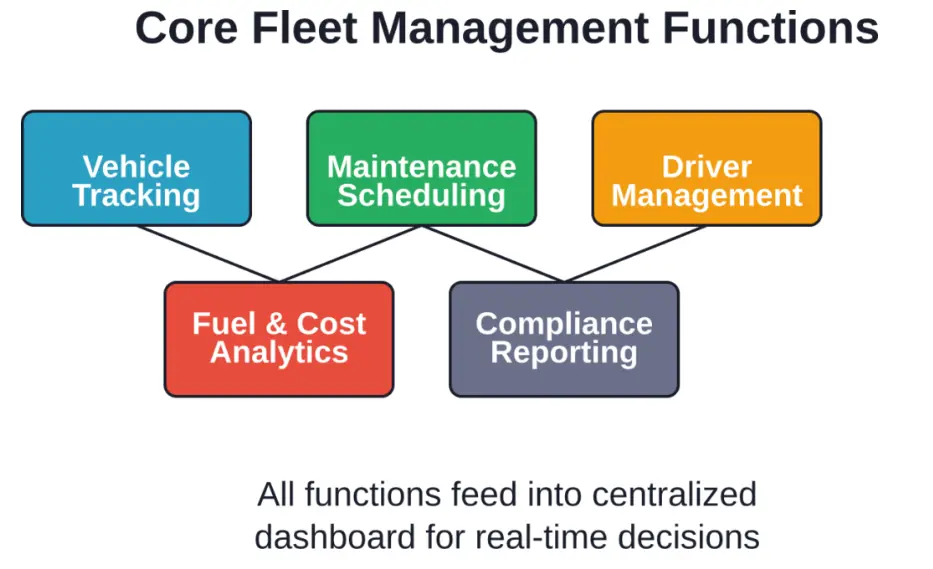
Beyond tracking, these platforms automate maintenance scheduling based on mileage, engine hours, or time intervals. Automated alerts prevent missed oil changes or tire rotations that lead to breakdowns.
Driver management features track hours, monitor safety metrics, and identify coaching opportunities. Some systems integrate dashcams and provide driver scorecards based on acceleration, braking, and cornering behavior.
Compliance reporting simplifies regulatory requirements. Electronic logging devices (ELDs), hours-of-service tracking, and automated IFTA reporting reduce administrative burden and audit risk.
Assess Your Business Needs Before Shopping
Fleet size matters. A company running five delivery vans has different requirements than one managing 200 long-haul trucks.
Small businesses often need straightforward tracking and basic maintenance reminders. Enterprise fleets require advanced analytics, custom reporting, API access, and support for multiple user roles.
Industry-specific needs shape the decision too. Waste management companies need route optimization for collection schedules. Delivery operations prioritize proof-of-delivery features and customer communication tools. Construction fleets focus on equipment utilization and jobsite tracking.
Think about current pain points. What’s costing the most money or time right now? Excessive fuel consumption? Vehicle downtime? Compliance violations? Safety incidents? The right system should directly address these specific challenges.
Budget constraints are real. Pricing varies widely across platforms, and many vendors offer custom pricing that makes comparison difficult. Some vendors like Verizon Connect offer custom prices for advanced metrics and add-ons like dashcams and fuel card integrations. Understanding total cost of ownership — including hardware, monthly subscriptions, implementation, and training — prevents sticker shock later.
Essential Features to Look For
Not all fleet management systems offer the same capabilities. Some features are non-negotiable; others depend on specific operational needs.
Real-Time GPS Tracking and Geofencing
GPS tracking provides live location data for every vehicle. This visibility helps dispatch the closest vehicle to new jobs, verify arrival times, and recover stolen assets.
Geofencing creates virtual boundaries around locations. Automated alerts trigger when vehicles enter or exit these zones, perfect for verifying jobsite visits or monitoring unauthorized use after hours.
Maintenance Management and Alerts
Preventive maintenance reduces costly breakdowns. Systems track service schedules based on mileage, hours, or calendar intervals and send automatic reminders before maintenance is due.
Integration with maintenance shops or CMMS (Computerized Maintenance Management System) platforms streamlines work order creation and parts inventory management.
Driver Behavior Monitoring and Safety Tools
Telematics captures driving events — harsh braking, rapid acceleration, sharp turns, speeding. This data identifies risky drivers who need coaching and rewards safe operators.
Some platforms now incorporate dashcams with AI-powered event detection. When sensors detect a collision or near-miss, the system automatically saves video footage for review. This capability has become particularly valuable for insurance claims and liability protection.
Fuel Management and Cost Tracking
Fuel represents one of the largest fleet expenses. Monitoring fuel consumption per vehicle, per route, or per driver reveals inefficiencies.
Integration with fuel card programs provides transaction-level visibility. Managers can spot unauthorized purchases, unusual fill volumes, or fuel theft immediately.
Route Optimization and Dispatch
Route planning algorithms calculate the most efficient paths based on stops, traffic, time windows, and vehicle capacity. This reduces miles driven, fuel consumed, and time on the road.
Dispatch features let managers assign jobs to drivers, communicate updates, and track completion status in real-time.
Compliance and Reporting
Regulatory compliance can’t be ignored. ELD functionality for hours-of-service tracking, DVIR (Driver Vehicle Inspection Report) digital forms, and IFTA mileage reporting by jurisdiction keep fleets audit-ready.
Custom reporting capabilities let managers create dashboards and scheduled reports tailored to specific KPIs.
| Feature Category | Small Fleets (1-25 vehicles) | Mid-Size Fleets (26-100 vehicles) | Enterprise Fleets (100+ vehicles) |
|---|---|---|---|
| GPS Tracking | Essential | Essential | Essential |
| Maintenance Alerts | Essential | Essential | Essential |
| Driver Scorecards | Helpful | Essential | Essential |
| Dashcam Integration | Optional | Helpful | Essential |
| Route Optimization | Helpful | Essential | Essential |
| API Access | Not needed | Helpful | Essential |
| Custom Reporting | Helpful | Essential | Essential |
Improve Your EV Fleet Setup with ECOFACTOR
The right fleet management system should match how your vehicles are actually used each day. If electric vehicles are part of the fleet, ECOFACTOR can help bring charging into that setup with charging stations, station management tools, and a mobile app for iOS and Android.
The charging station map helps drivers find charging points and check station information before they arrive. Businesses can also use ECOFACTOR’s online store to buy chargers, cables and adapters for offices, parking areas, depots, or other EV charging locations.
ECOFACTOR can support EV fleet setups with:
- Charging tools for company and commercial locations
- Station access and activity management
- Mobile support for drivers using charging points
- Hardware and accessories for regular EV charging
Contact ECOFACTOR to make EV charging part of the fleet system you choose, instead of handling it separately later.
Integration Capabilities Make or Break Efficiency
Fleet management software doesn’t exist in isolation. It needs to communicate with accounting systems, dispatch platforms, fuel card providers, and maintenance vendors.
Integration capabilities determine whether data flows automatically between systems or requires manual entry. Poor integration creates data silos, duplicate work, and opportunities for errors.
Check for native integrations with tools already in use. Many platforms connect to popular accounting software like QuickBooks or Xero, pulling vehicle expenses and maintenance costs directly into financial records.
API availability matters for custom integrations. Businesses with unique workflows or proprietary systems need flexible APIs to build connections that vendors haven’t pre-built.
Some industries benefit from specialized integrations. Delivery companies need connections to e-commerce platforms or order management systems. Service businesses require integration with field service management software. Construction fleets often need links to project management tools.
Data format compatibility prevents headaches during implementation. Systems that support standard data formats and export options make migration easier if switching from another platform.
Evaluate Ease of Use and User Experience
Powerful features don’t matter if nobody can figure out how to use them. Ease of use directly impacts adoption rates among drivers, dispatchers, and managers.
User interface design affects daily productivity. Cluttered dashboards with buried features slow down operations. Clean, intuitive interfaces let users find what they need quickly.
Mobile apps are critical for drivers. They’ll check routes, update delivery status, complete digital inspections, and communicate with dispatch from their phones. If the mobile experience is clunky, drivers will resist using it.
Training requirements vary dramatically between platforms. Some systems require extensive training programs and weeks of ramp-up time. Others work intuitively with minimal instruction.
Look for platforms that offer trial periods or demos. Actually clicking through the interface, building a report, or creating a geofence reveals usability issues that product marketing glosses over.
Customer support quality matters when things go wrong. Check whether support is available 24/7 or only during business hours. Look for multiple contact channels — phone, email, chat. Response time expectations and resolution rates indicate how seriously a vendor takes customer success.
Consider Scalability and Future Growth
The fleet needs change. A business running 10 vehicles today might operate 50 in three years. The system needs to scale without requiring a complete platform switch.
Pricing models reveal scalability challenges. Per-vehicle pricing that seems reasonable for small fleets can become prohibitively expensive at scale. Tiered pricing with volume discounts provides better long-term economics.
Feature availability across tiers affects growth too. Some vendors lock advanced capabilities behind enterprise plans, forcing upgrades when the fleet reaches certain thresholds.
Technical scalability matters for large operations. Can the platform handle hundreds or thousands of vehicles without performance degradation? Does it support multiple locations, user roles, and complex organizational structures?
Data retention policies impact historical analysis. Systems that only store data for 90 days limit the ability to identify long-term trends or seasonal patterns.
Calculate Total Cost of Ownership
Sticker price doesn’t tell the whole story. Total cost of ownership includes hardware, software subscriptions, installation, training, support, and ongoing maintenance.
Hardware costs vary by system. Some platforms require proprietary GPS devices installed in each vehicle. Others work with smartphones or support third-party hardware. Per-vehicle hardware costs can range from $50 to $500 or more.
Monthly subscription fees typically charge per vehicle. Rates depend on features included in each tier. Budget platforms start around $15-25 per vehicle monthly, while enterprise solutions can exceed $50-75 per vehicle with advanced features.
Implementation and training expenses are often overlooked. Professional installation of GPS devices, data migration from previous systems, custom integration development, and staff training all carry costs beyond the subscription price.
Add-on features and modules increase the monthly bill. Dashcams, ELD compliance, fuel card integration, and advanced analytics usually cost extra.
Calculate ROI based on specific improvements. How much will reducing fuel consumption by 10% save annually? What’s the value of avoiding one major accident through improved driver monitoring? How much time will automated maintenance scheduling save fleet managers?
Well-implemented fleet management systems often demonstrate positive return on investment through fuel savings, reduced insurance premiums, improved vehicle utilization, and decreased administrative time.
Security, Data Privacy, and Compliance
Fleet management systems collect sensitive data — vehicle locations, driver behavior, customer information, operational patterns. Security and privacy aren’t optional considerations.
Data encryption protects information in transit and at rest. Look for platforms that use industry-standard encryption protocols and secure cloud infrastructure.
Access controls and user permissions prevent unauthorized data exposure. Role-based access ensures drivers only see their own information while managers view fleet-wide data.
GDPR compliance matters for fleets operating in Europe or handling European customer data. California Consumer Privacy Act (CCPA) requirements apply to businesses serving California residents.
Data ownership and portability rights should be clearly defined in vendor contracts. What happens to historical data if you switch platforms? Can you export all data in usable formats?
Driver privacy concerns require careful handling. Some jurisdictions limit how employers can monitor employee vehicles or activities. Transparent policies about what’s tracked and how data is used build trust with drivers.
Research Vendor Reputation and Track Record
The vendor matters as much as the product. A feature-rich platform from an unreliable company creates long-term headaches.
Company stability and financial health indicate whether the vendor will be around in five years. Startups might offer innovative features but carry higher risk of acquisition or shutdown.
Customer reviews reveal real-world experiences. Look beyond star ratings to read detailed feedback about implementation challenges, support responsiveness, and long-term satisfaction.
Industry experience shows whether a vendor understands specific operational challenges. A platform built for long-haul trucking might not work well for last-mile delivery, even if features look similar on paper.
Product roadmap and update frequency matter for long-term value. Vendors that regularly release new features and improvements provide better return on investment than those with stagnant products.
Community discussions on platforms like Reddit often provide unfiltered opinions. Fleet managers share honest assessments of what works and what doesn’t, highlighting issues that never appear in marketing materials.
Test Before Committing
Never buy fleet management software without testing it first. The gap between marketing promises and actual functionality can be significant.
Request demos from top candidates. Ask to see specific workflows relevant to operations — creating a route, generating a maintenance report, investigating a speeding alert.
Free trials offer hands-on experience. Install the hardware in a few vehicles, give drivers access to mobile apps, and use the system for real work. Issues that seem minor during a demo become major frustrations during daily use.
Pilot programs with limited vehicle rollouts reduce implementation risk. Test the system with a subset of the fleet before committing to company-wide deployment.
Involve actual users in evaluation. Drivers, dispatchers, and mechanics who’ll use the system daily often spot usability problems that managers miss.
Compare top candidates side-by-side using a scoring rubric. Rate each platform on must-have features, ease of use, integration quality, support responsiveness, and total cost.
| Evaluation Criteria | Weight | Platform A Score | Platform B Score | Platform C Score |
|---|---|---|---|---|
| Core Features | 30% | 8/10 | 9/10 | 7/10 |
| Ease of Use | 20% | 7/10 | 6/10 | 9/10 |
| Integration Quality | 20% | 9/10 | 7/10 | 8/10 |
| Total Cost | 15% | 6/10 | 8/10 | 7/10 |
| Support & Training | 15% | 8/10 | 7/10 | 9/10 |
| Weighted Score | — | 7.8 | 7.7 | 8.0 |
Common Mistakes to Avoid
Several pitfalls trip up fleet managers during the selection process. Awareness helps avoid costly errors:
- Focusing only on price creates long-term problems: The cheapest option often lacks critical features, forcing workarounds or manual processes that negate savings.
- Ignoring user feedback leads to adoption failures: Software that management loves but drivers hate won’t deliver expected benefits.
- Overlooking integration needs creates data silos: Platforms that can’t share information with existing systems require duplicate data entry and reduce efficiency.
- Choosing based on features that’ll never get used wastes money: Pay for capabilities that address actual business needs, not impressive-sounding options that remain dormant.
- Skipping the fine print in contracts causes surprises later: Watch for automatic renewal terms, price increase clauses, data ownership provisions, and early termination penalties.
- Rushing implementation without proper planning undermines success: Even the best platform fails without adequate training, clear processes, and management support.
Implementation Best Practices
Selecting the right system is only half the battle. Successful implementation determines whether the investment pays off:
- Create a detailed rollout plan: Identify who needs training, establish timelines for hardware installation, and plan for data migration from legacy systems.
- Start with a pilot group: Deploy to a small portion of the fleet first, work out issues, and refine processes before full rollout.
- Communicate clearly with all stakeholders: Explain why the change is happening, what benefits it brings, and how it affects daily workflows. Address concerns proactively.
- Provide comprehensive training: Different user roles need different training depth — drivers need mobile app basics, dispatchers need full platform capabilities, managers need reporting and analytics.
- Monitor adoption metrics: Track login frequency, feature usage, and user feedback during the first 90 days. Low adoption signals training gaps or usability issues.
- Establish clear policies around system use: Define expectations for driver check-ins, inspection completion, and communication protocols.
- Schedule regular reviews: Monthly check-ins during the first quarter help identify problems quickly and adjust processes as needed.
Questions to Ask Every Vendor
Asking the right questions reveals information that marketing materials hide. Here are critical questions for every vendor conversation:
- What’s included in the base price, and what costs extra? Get specific about add-on modules, hardware, installation, training, and support.
- How long does typical implementation take? Understand the timeline from contract signing to full operational deployment.
- What’s the cancellation policy and contract length? Avoid getting locked into multi-year agreements without exit options.
- How is customer data backed up and protected? Understand disaster recovery plans and data redundancy.
- What level of customer support is included? Clarify availability hours, response time guarantees, and escalation procedures.
- Can you provide references from similar businesses? Talk to customers with comparable fleet sizes and operational profiles.
- What integrations are available, and do they cost extra? Verify native integrations with critical business systems.
- How often do you release updates, and are they included? Understand the product development cycle and whether upgrades carry additional fees.
Frequently Asked Questions
What’s the average cost of fleet management software per vehicle?
Pricing varies significantly based on features and fleet size. Budget options start around $15-25 per vehicle monthly for basic GPS tracking and reporting. Mid-tier platforms with maintenance management, driver safety features, and better integrations typically range from $30-50 per vehicle monthly. Enterprise solutions with advanced analytics, custom reporting, and premium support can exceed $50-75 per vehicle monthly. Hardware costs add another $50-500 per vehicle upfront.
Do small fleets really need fleet management software?
Even small fleets benefit from basic tracking and maintenance management. The efficiency gains from route optimization, fuel monitoring, and automated maintenance alerts often justify the cost for fleets with as few as three to five vehicles. The key is choosing a platform scaled to small fleet needs rather than paying for enterprise features that won’t get used.
How long does it take to implement a fleet management system?
Implementation timelines depend on fleet size and system complexity. Small fleets (under 25 vehicles) with straightforward needs can be operational in two to four weeks. Mid-size fleets typically require four to eight weeks for hardware installation, data migration, and training. Enterprise deployments with custom integrations may take three to six months for complete rollout.
Can fleet management systems work with mixed vehicle types?
Most modern platforms support mixed fleets including cars, vans, trucks, and specialized equipment. The FMS-Standard interface enables manufacturer-independent telematics across major vehicle brands. However, specialized equipment like construction machinery or refrigerated units may require additional sensors or integrations to capture all relevant data.
What ROI should be expected from fleet management software?
Well-implemented systems can deliver improvements in fuel costs, vehicle utilization, maintenance expenses, and administrative time through better visibility and optimization. Most fleets see a positive return on investment within the first year. Insurance premium reductions from improved safety records can add another 5-15% in savings.
Are cloud-based or on-premise solutions better for fleet management?
Cloud-based platforms dominate the market and offer advantages for most fleets — lower upfront costs, automatic updates, remote access, and scalability without infrastructure investment. On-premise solutions make sense only for very large fleets with dedicated IT teams, strict data residency requirements, or unique security needs that cloud platforms can’t meet.
How do fleet management systems handle offline connectivity?
Quality systems cache data locally when vehicles operate in areas without cellular coverage. GPS coordinates, driver logs, and vehicle diagnostics store on the device and sync automatically when connectivity restores. This ensures no data loss in rural areas or underground facilities where signals are weak or absent.
Making the Final Decision
Choosing fleet management software is a business decision that impacts operations for years. The right platform reduces costs, improves safety, and provides the visibility needed to make smarter decisions.
The process boils down to knowing operational needs, evaluating platforms systematically against those needs, testing top candidates thoroughly, and implementing with a solid plan.
Don’t rush this decision. Take the time to demo multiple platforms, talk to actual users, and pilot tests before committing. The cost of getting it wrong — in wasted money, lost productivity, and change fatigue from switching systems later — far exceeds the value of moving quickly.
Start by documenting specific requirements and pain points. Build a comparison framework that weights criteria based on what actually matters to the operation. Involve the people who’ll use the system daily in evaluation.
The fleet management market continues evolving with IoT sensors, AI-powered analytics, and deeper integrations. Choose a vendor committed to ongoing innovation and customer success, not just making a sale.
Ready to transform fleet operations? Download vendor demos, schedule trial periods, and start comparing platforms against the specific needs and budget of the business. The right system is out there — it just takes systematic evaluation to find it.