

Table of contents:
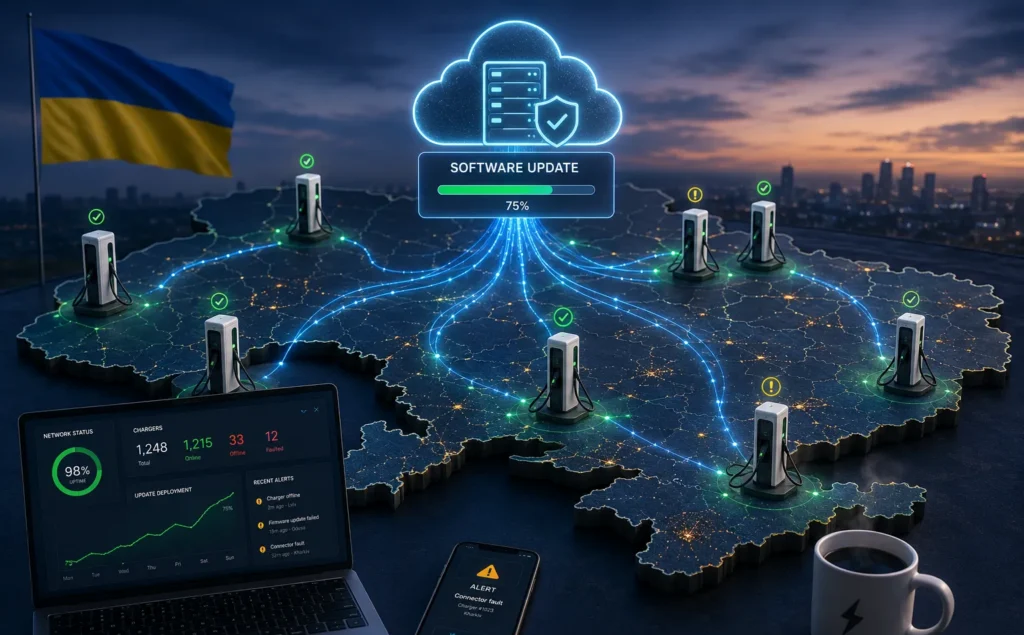
Keeping an EV charging network running smoothly is not only about installing reliable hardware. The software inside every charging station needs regular updates to fix bugs, improve security, support new features, and stay compatible with changing industry standards.
For operators with dozens or hundreds of chargers, updating each unit on site is simply not practical. Remote software updates make it possible to roll out improvements across an entire network from a central management platform, saving time while reducing maintenance costs and unnecessary downtime. At the same time, every update needs careful planning. A poorly managed rollout can create new problems instead of solving existing ones.
In this article, we’ll look at how remote software updates work, why they matter for EV charging infrastructure, what risks operators should consider, and the practices that help keep updates safe and reliable.
We remind you that you can purchase home and commercial charging stations in our store, as well as use public charging stations ECOFACTOR located throughout Ukraine. For convenient access to charging infrastructure, we recommend using our mobile app, available on iOS and Android.
What Remote Software Updates Actually Include
Installing an EV charger is only the beginning of its working life. Once a charger is connected to a network, the software running inside it needs regular attention. New vehicles appear, charging standards evolve, security threats change, and operators expect their equipment to perform reliably for years. Remote software updates make it possible to keep charging stations current without sending a technician to every location.
The software inside a charger is often referred to as firmware. It controls many of the charger’s core functions, from communication with the charge point management system (CPMS) to charging logic, diagnostics, safety behavior, and support for connected hardware. Updating that software helps the charger continue operating as intended throughout its lifecycle.
A software update can introduce small improvements that users never notice directly, while fixing issues that would otherwise lead to failed charging sessions or unnecessary maintenance visits. In other cases, an update adds support for new protocols or improves compatibility with newer electric vehicles and backend systems.
Remote software updates may include security patches that address newly discovered vulnerabilities, bug fixes that improve charging reliability, performance improvements for communication, startup, or energy management, support for updated charging standards and protocols, new monitoring, reporting, or diagnostic capabilities, and compatibility improvements for CPMS platforms, payment systems, or additional hardware. Not every update adds visible features. Some of the most valuable releases happen quietly in the background, reducing future problems before drivers or operators experience them.
Key Update Types
There are two main ways to update EV charger software.
Over-the-air (OTA) updates are delivered remotely through the charging management platform or the manufacturer’s update service. Once an update is approved, operators can distribute it to one charger or thousands of chargers from a single interface.
Manual updates require someone to visit the site and install the new software locally. Depending on the equipment, this may involve a service laptop, USB device, or dedicated maintenance interface.
OTA updates have become the preferred approach for most commercial charging networks because they reduce travel, shorten maintenance time, and make it easier to keep every charger on the same software version. Manual updates still have their place, particularly when chargers have limited internet connectivity or when a recovery procedure is required after a failed update.
OTA Updates vs Manual Updates
Both update methods remain important. The right choice depends on network size, site connectivity, security requirements, and the purpose of the update.
| Feature | OTA Updates | Manual Updates |
|---|---|---|
| Installation | Remote through CPMS or update platform | Performed on site by technicians |
| Speed | Fast deployment across many chargers | Slower for large networks |
| Operating costs | Lower ongoing maintenance costs | Higher labor and travel costs |
| Best suited for | Routine updates, security patches, feature releases | Recovery procedures, isolated sites, offline chargers |
| Scalability | Excellent for multi-site networks | Practical mainly for small deployments |
| Monitoring | Centralized progress tracking | Individual verification at each charger |
For most commercial charging networks, OTA updates become the standard approach once the number of charging stations begins to grow. Manual updates remain valuable when internet connectivity is unavailable, local security policies restrict remote access, or a charger requires direct servicing after an unsuccessful update.
Neither method completely replaces the other. In practice, many operators use remote updates for day-to-day maintenance while keeping manual procedures available for exceptional situations.

Keep Charging Infrastructure Up to Date With ECOFACTOR
Managing charging infrastructure often involves more than hardware alone. Alongside charging stations, ECOFACTOR provides energy solutions such as hybrid inverters, battery systems, and solar panels. The company also offers digital tools through its iOS and Android app, while the charging station map helps drivers find and access charging locations.
ECOFACTOR can support charging operations with:
- Software and hardware solutions for charging infrastructure
- Tools that improve access to charging network information
- Energy technologies for integrated charging projects
- Cables and accessories for installation and maintenance
Contact ECOFACTOR to discuss solutions for modern charging infrastructure management.
Benefits of Remote Software Updates for EV Chargers
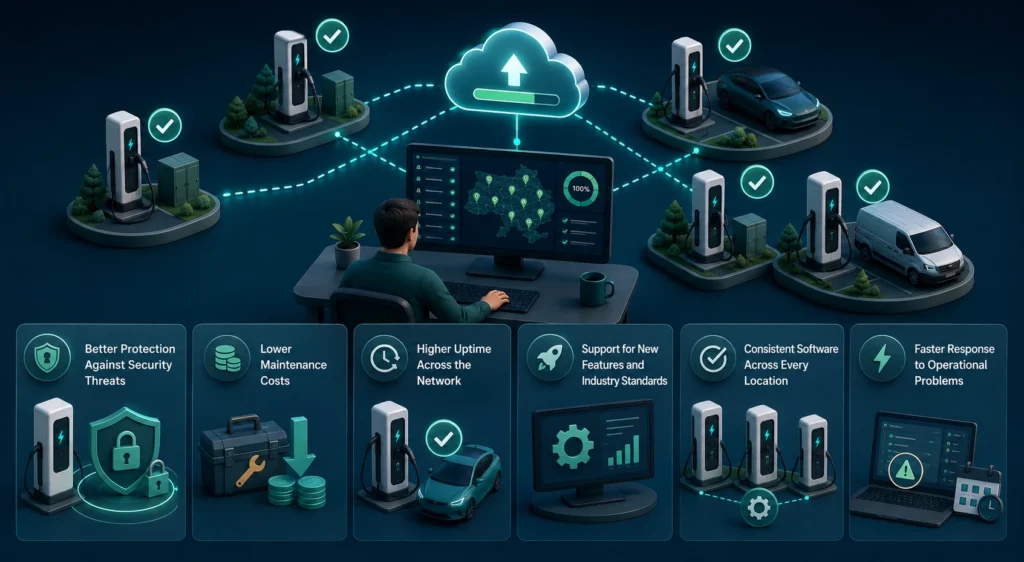
Remote software updates solve a practical problem. Instead of treating every charger as an isolated device, operators can maintain an entire network from one place. That saves time, but the bigger advantage is consistency. Every charger follows the same software standards, receives the same fixes, and stays compatible with the rest of the network.
Better Protection Against Security Threats
Like any connected device, an EV charger can become a target if known vulnerabilities remain unpatched. As charging infrastructure expands, cybersecurity becomes an ongoing operational responsibility rather than something operators deal with only occasionally.
Remote software updates make it possible to respond quickly when new security issues are identified. After an update has been tested and approved, it can be deployed across the network without waiting for scheduled maintenance visits. Regular security updates help operators close known vulnerabilities before they can be exploited, protect communication between chargers and backend systems, reduce the risk of unauthorized access, keep customer and transaction data better protected, and maintain a more secure and consistent charging network.
Lower Maintenance Costs
Every technician visit adds travel time, labor costs, scheduling effort, and sometimes temporary charger downtime. When those visits are required only to install new software, they become difficult to justify, especially for networks covering multiple regions.
With remote updates, routine software maintenance happens from a central management platform. Field engineers can focus on hardware repairs and inspections instead of tasks that no longer require physical access. For operators managing large charging networks, those savings accumulate over the lifetime of the equipment.
Higher Uptime Across the Network
Many charging issues originate in software rather than hardware. Communication errors, failed charging sessions, unexpected restarts, and payment problems can often be resolved through software improvements.
Remote updates allow operators to address these issues much faster than waiting for scheduled maintenance. Shorter response times help keep chargers available, improve session success rates, and reduce the number of customer complaints. For drivers, the result is simple. The charger works when they arrive.
Support for New Features and Industry Standards
The EV industry changes quickly. Vehicle manufacturers introduce new technologies, charging protocols evolve, and operators expect additional capabilities from their infrastructure.
Instead of replacing existing hardware, many improvements can be delivered through software. Depending on the charger and its hardware capabilities, updates may introduce improved diagnostics, better load management, expanded reporting, communication enhancements, or support for newer standards. This helps extend the useful life of charging equipment while protecting the original investment.
Consistent Software Across Every Location
One of the biggest operational challenges for large charging networks is version fragmentation. If different chargers run different software versions, troubleshooting becomes more complicated because the same issue may not appear everywhere.
Keeping every compatible charger on the same approved software release provides several advantages: easier technical support, faster troubleshooting, more predictable charger behavior, simpler maintenance planning, and lower risk of compatibility issues. Consistency may not be visible to drivers, but it makes everyday network management considerably easier.
Faster Response to Operational Problems
No charging network operates perfectly all the time. Software bugs are sometimes discovered only after equipment has been deployed in real conditions. The important question is how quickly those issues can be corrected.
Without remote updates, operators often need to wait until technicians can visit every affected site. With OTA deployment, corrections can begin as soon as testing is complete, reducing both downtime and operational disruption.
Risks of Remote Software Updates
Updating software always introduces change. While remote deployment offers clear operational advantages, every update should be treated as a controlled process rather than a routine click of a button.
Interrupted Updates
A charger losing power or network connectivity during installation can fail to complete the update correctly. Modern charging systems reduce this risk with verification procedures and recovery mechanisms, but operators should still plan for unexpected interruptions.
Installing the Wrong Software Version
Not every firmware release supports every hardware revision. Installing software intended for a different charger model may lead to communication problems, missing functions, or failed installations. Version control and compatibility checks should always happen before deployment begins.
Cybersecurity Risks
Because updates modify software running inside critical infrastructure, they must be delivered securely. Without proper authentication, encrypted communication, and software verification, attackers could attempt to distribute unauthorized software or interfere with the update process. Secure update mechanisms significantly reduce these risks by ensuring that chargers install only trusted software packages.
Version Fragmentation
Rolling out updates gradually makes sense, but incomplete deployments can leave different locations running different software versions for extended periods. That increases support complexity because operators must identify which chargers have received the update and which still require attention. A well-managed rollout includes clear version tracking and progress reporting across the entire network.
Connectivity Limitations
Remote updates depend on reliable communication between chargers and the management platform. Sites with unstable mobile networks, firewall restrictions, or intermittent internet access may experience delayed downloads or incomplete installations. In these situations, retry mechanisms and staged deployment become particularly important.
Compliance Requirements
Some markets apply additional rules to charging infrastructure, particularly where billing accuracy, certified metering, or payment processing are regulated. Software changes affecting these systems may require additional testing or validation before broad deployment. Planning for compliance early helps avoid unnecessary operational disruptions later.
Best Practices for Safe Software Updates
Successful software updates begin long before anyone presses the “Deploy” button. A structured update process reduces unnecessary risks, keeps charging stations available, and gives operators confidence that changes can be introduced without affecting everyday operations.
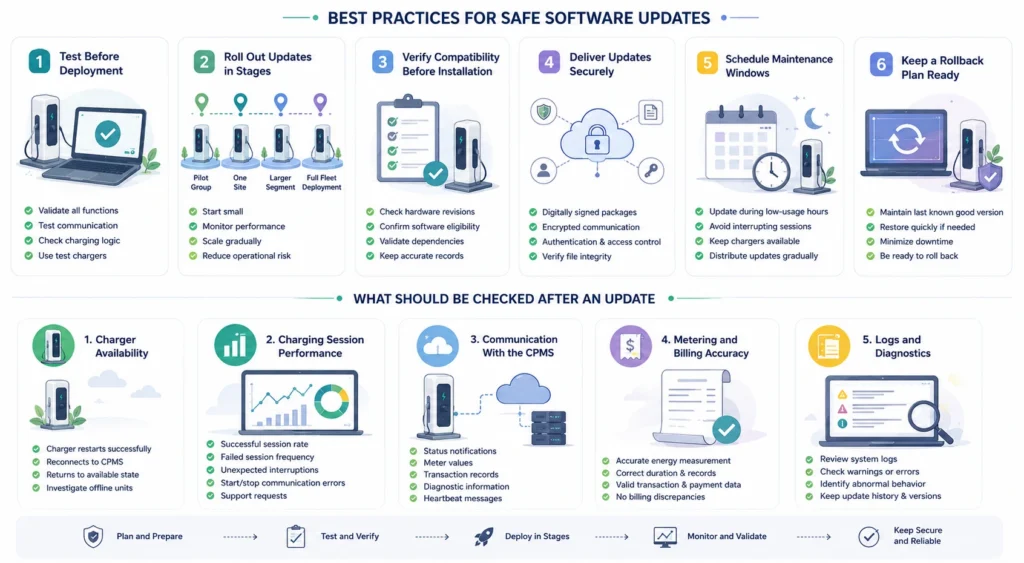
Test Before Deployment
Every software release should be validated before it reaches production chargers. Even a minor update can affect communication, payment processing, charging logic, or compatibility with certain hardware revisions.
Testing should confirm that the charger starts normally, communicates with the CPMS, completes charging sessions correctly, and reports operational data without errors. Many operators keep a small group of chargers specifically for testing new releases before deploying them across the rest of the network.
Roll Out Updates in Stages
Updating every charger at the same time may sound efficient, but it leaves little room to react if unexpected issues appear. A staged rollout provides much better control. Operators often begin with a limited number of charging stations, monitor their performance, and then continue deployment only after confirming everything works as expected.
A typical rollout might progress from a pilot group of chargers to one region or customer site, then to a larger network segment, and finally to full fleet deployment. This approach limits operational risk while allowing problems to be identified early.
Verify Compatibility Before Installation
Charging networks rarely consist of identical equipment. Different hardware revisions, communication modules, payment terminals, and software integrations may require different firmware versions.
Before deployment, operators should confirm that each charger is eligible for the planned update. Compatibility checks help avoid failed installations and reduce unnecessary service calls. Maintaining accurate records of charger models, hardware revisions, and installed software versions makes this process much easier.
Deliver Updates Securely
Software updates should always be treated as trusted system changes rather than ordinary file transfers. A secure update process typically includes digitally signed software packages, encrypted communication channels, authentication between the charger and the update platform, access controls defining who can approve or initiate updates, and verification that downloaded files have not been altered. These measures protect the charging network from unauthorized software and reduce cybersecurity risks.
Schedule Maintenance Windows
Drivers expect charging stations to be available whenever they arrive. Installing software during busy periods may interrupt active charging sessions or temporarily reduce station availability.
Most operators schedule updates during periods of lower utilization, such as overnight or outside peak business hours. For large networks, updates can be distributed gradually so that nearby charging locations remain available while individual chargers receive new software.
Keep a Rollback Plan Ready
Not every software release performs exactly as expected once deployed at scale. If an update introduces unexpected behavior, operators should be able to restore the previous stable version quickly. A rollback capability reduces downtime and allows engineers to investigate issues without leaving chargers unavailable for extended periods. Keeping a verified “last known good” software version is considered standard practice for critical infrastructure.
What Should Be Checked After an Update
Installing new software is only part of the process. Operators still need to confirm that charging stations continue working normally once the update has finished. Post-update monitoring helps identify problems before drivers begin reporting them.
Charger Availability
The first check is straightforward. Every charger should successfully restart, reconnect to the management platform, and return to an available operating state. Chargers that remain offline or repeatedly restart require immediate investigation.
Charging Session Performance
Software updates should improve reliability, not reduce it. Operators commonly monitor indicators such as successful charging session rate, failed session frequency, unexpected charging interruptions, start and stop communication errors, and customer support requests after deployment. Even small changes in these metrics can indicate software-related issues.
Communication With the CPMS
A charger may appear operational while silently failing to exchange data with the management platform. After an update, operators should verify that chargers continue sending status notifications, meter values, transaction records, diagnostic information, and heartbeat messages. Stable communication confirms that the charger remains fully integrated with the rest of the network.
Metering and Billing Accuracy
Charging data forms the basis for customer billing, reporting, and operational analysis. Following a software update, operators should confirm that energy measurements, charging duration, transaction records, and payment information remain accurate and consistent. This is particularly important for public charging networks where incorrect transaction data can create customer disputes.
Logs and Diagnostics
System logs provide valuable information about how chargers behave after an update. Reviewing diagnostic information helps operators identify warning messages, communication failures, repeated restarts, or other abnormal behavior that may not yet be visible to drivers. Keeping update records, timestamps, software versions, and deployment history creates a useful audit trail for future maintenance and troubleshooting.
How OCPP Makes Remote Updates Easier
Remote software updates would be much harder to manage if every charger used its own proprietary communication method. That is one of the reasons the Open Charge Point Protocol (OCPP) has become the industry standard. It gives charging stations and charge point management systems (CPMS) a common language for exchanging information, regardless of the hardware manufacturer.
For operators managing chargers from different vendors, this makes software maintenance far more practical. Instead of relying on separate tools for each brand, they can monitor and update compatible equipment through a single management platform.
OCPP 1.6
OCPP 1.6 introduced standardized support for remote firmware updates. Through the protocol, a CPMS can instruct a charger to download new software, monitor the installation process, and receive status notifications that indicate whether the update completed successfully. Because OCPP 1.6 remains one of the most widely deployed versions in commercial charging infrastructure, many existing charging networks already support these capabilities.
OCPP 2.0.1
OCPP 2.0.1 expands remote update functionality with stronger security and more detailed operational control. Compared with earlier versions, it provides improvements such as better update scheduling, more detailed installation status reporting, improved diagnostics, enhanced security for software delivery, and better interoperability between chargers and management platforms. These additions become increasingly valuable as charging networks grow and operators manage equipment across multiple locations.
Security Profile 3
One of the most important improvements in OCPP 2.0.1 is Security Profile 3. It strengthens communication between the charger and the management platform by supporting authenticated devices, encrypted communication, and verification that software packages come from trusted sources before installation begins. While the exact implementation depends on the charging equipment and backend platform, these security measures help reduce the risk of unauthorized software being installed on networked chargers.
Managing Chargers From Different Manufacturers
Many charging networks do not rely on a single hardware supplier. Equipment is often added over several years as networks expand, meaning operators may work with chargers from multiple manufacturers at the same time. Using OCPP-compatible equipment simplifies software management because compatible chargers can communicate through the same CPMS instead of requiring separate proprietary systems. That reduces administrative work, simplifies monitoring, and makes future network expansion much easier.
Frequently Asked Questions
What is a remote software update for an EV charger?
A remote software update allows an operator to install new firmware or software on a charging station over the internet without visiting the site. Updates are typically managed through a charge point management system (CPMS) or the charger’s update platform and can improve security, fix bugs, add new features, or enhance compatibility.
How often should EV chargers receive software updates?
There is no fixed schedule. Updates are usually released when manufacturers address security vulnerabilities, improve performance, introduce new functionality, or support updated charging standards. Operators should evaluate each release, test it, and deploy it when appropriate rather than updating on a strict timetable.
Can a software update interrupt charging sessions?
It can if it is performed while a charger is in use. To avoid disrupting drivers, operators typically schedule updates during maintenance windows or periods of low demand. Many management platforms allow updates to be delayed until a charging session has finished.
Are remote software updates secure?
They can be, provided they follow established security practices. Trusted update systems use encrypted communication, authenticated devices, digitally signed software packages, and access controls to ensure chargers install only approved software from verified sources.
What happens if a software update fails?
Most commercial charging systems include recovery procedures or allow operators to roll back to the previous stable software version. Monitoring the update process and deploying releases in stages helps identify problems early and limits their impact on the rest of the charging network.
Are OTA updates better than manual updates?
For most commercial charging networks, yes. OTA updates reduce travel, lower maintenance costs, and make it possible to update hundreds of chargers from one platform. Manual updates are still useful for chargers with limited connectivity, highly restricted IT environments, or situations where a technician is already performing on-site maintenance.
Does every EV charger support remote software updates?
No. Remote update capabilities depend on the charger’s hardware, firmware, communication module, and compatibility with the management platform. Before purchasing charging equipment, businesses should confirm that it supports secure OTA updates and fits their long-term maintenance strategy.
Final Thoughts
Reliable EV charging depends on more than durable hardware. Every charging station is part of a connected system that continues to evolve long after installation. Security requirements change, communication standards develop, software bugs are discovered, and new capabilities become available throughout the life of the equipment.
Remote software updates give operators a practical way to keep pace with those changes without sending technicians to every location. When updates are planned carefully, tested thoroughly, deployed in stages, and monitored after installation, they improve network reliability while reducing maintenance costs and operational effort.
As the Ukrainian charging market continues to expand, software lifecycle management will become increasingly important alongside charger installation itself. Operators that invest in secure update processes today will be better prepared to maintain reliable charging networks as they grow in both size and complexity.